Deconstruct the technical components of an image URL under RFC 3986, comparing Content-Type headers, Data URIs, edge CDN delivery, and SQL database architectures.
The entire world of internet graphics is based on one essential principle, the Image URL. When you need to convert an image to url for embedding into a website, an application dashboard, or Markdown documentation, your computer requests the graphic through a web address. For screen clips and UI bug reports, turning a screenshot to url generates an edge-cached link that renders immediately across any destination.
Many developers and content teams view an image URL like they would a file path on their computer's hard drive. However, in today's modern web architectures, an image URL does not point to a single location within a physical sector of a server. An image URL is a standardized network contract that is defined and governed by Internet RFCs.
Understanding how image URLs function under the hood allows engineering teams to optimize page load speeds, eliminate broken graphics, and architect media storage systems that scale reliably across global edge networks. Explore the complete range of MediaToURL features to see how zero-egress CDN bandwidth delivers dependable media hosting.
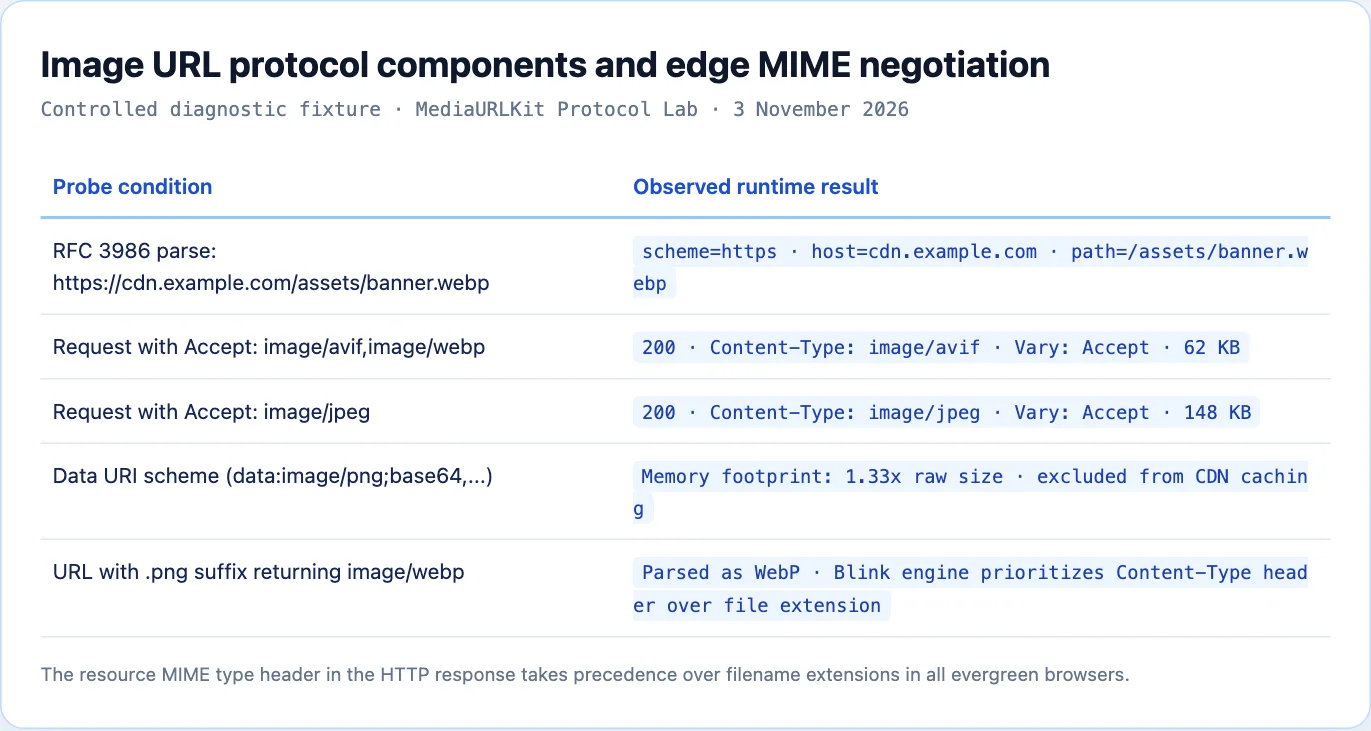
The RFC 3986 Anatomy of an Image URL
Under the Internet Engineering Task Force (IETF) specification RFC 3986, every web address represents a Uniform Resource Identifier (URI). An image URL breaks down into five distinct syntactic components:
  https://cdn.example.com:443/assets/photos/banner.webp?width=1200&q=80#crop
  └─┬─┘   └─────────────┘ └─┬─┘└──────────────────────┘ └───────────┘ └─┬──┘
Scheme       Authority     Port          Path                Query     Fragment
Inspect the technical function of each component (you can also test any live URL with MediaToURL Link Doctor to inspect these headers in real time):
1. Scheme (https)
The scheme specifies the protocol the client will need to access the resource. In today's modern web environment, the typical protocol used for accessing web-based graphics is HTTPS (HTTP over TLS), which provides end-to-end encryption to prevent a man-in-the-middle attack from intercepting or modifying data packets. Older, non-secure http:// schemes can cause mixed content security warnings in current versions of browsers if they are included within secure web pages.
2. Authority (cdn.example.com:443)
The authority component includes the domain name (or IP address), as well as a possible port. The client operating system uses the Domain Name System (DNS) to convert the hostname into an IP address. If the request is for an edge CDN, Anycast DNS will direct the request to the nearest available geographical location which helps reduce the amount of time it takes to travel back and forth over the network.
3. Path (/assets/photos/banner.webp)
The path specifies where the resource resides in the hierarchy of the storage namespace. Although the path is usually represented as a filesystem folder structure, it can be used to represent an arbitrary key in an object storage bucket or a routing parameter for an edge worker.
4. Query String (?width=1200&q=80)
The query string starts with a "?" and contains key-value pairs separated by "&". In current media pipelines, query parameters indicate to edge image optimization engines how to resize, compress, crop, or modify the source image in real time prior to storing the results in cache..
5. Fragment Identifier (#crop)
The fragment begins with a '#'. All fragments are processed on the client side only and do not get sent back to the origin server. Within specialized SVG graphic applications, fragments can be used to refer to specific elements within the SVG file by using their ID, or they can be used to set a viewing area within the SVG file using coordinates #svgView(viewBox(0,0,100,100)). are working properly on each platform.)
The Myth of the File Extension: Content-Type Precedence
A widespread misconception among web creators is that an image URL must end in .jpg, .png, or .webp for a browser to render the picture.
Prior to modern desktop operating systems being able to determine the format of a file from its suffix, a Web resource's content type was determined through the use of an HTTP header called Content-Type. This header is defined in RFC 9110 as the primary method for declaring the format of a resource.
Consider the following valid image URL:
https://files.mediatourl.com/a/9b3c48a7-7a8f-4b3e
This URL has no file extension. Yet when embedded inside an image tag:
<img src="https://files.mediatourl.com/a/9b3c48a7-7a8f-4b3e" alt="Architecture Diagram">
The browser issues an HTTP GET request. The edge server responds with:
HTTP/1.1 200 OK
Content-Type: image/webp
Content-Length: 41208
X-Content-Type-Options: nosniff
The browser reads Content-Type: image/webp. The Blink and WebKit layout engines pass the byte stream straight to the WebP hardware decoder thread. The image renders immediately without warnings.
Conversely, when the browser attempts to download an image from a URL that ends in .jpg, and the upstream server responds with Content-Type: text/html, then the browser will try to parse HTML markup as JPEG data and will fail to do so, resulting in an image decode failure. The file extension is only a visual aid used by people; however, the HTTP header determines how content is rendered on the screen..
Hosted Image URLs vs Base64 Data URIs
Instead of linking to an external HTTP URL, web developers sometimes embed images directly into HTML or CSS using Data URIs defined by RFC 2397:
<img src="data:image/png;base64,iVBORw0KGgoAAAANSUhEUgAAAAUA..." alt="Embedded Pixel">
Data URIs include the entire binary content of a file in the document string by utilizing Base64 encoding. Although it is acceptable to use Data URIs when dealing with very small micro-icons (less than 1 kilobyte) so you can avoid making an extra HTTP request, the use of Data URIs for larger images will result in significant performance issues.
The Hidden Costs of Data URIs:
- 33% File Size Expansion: Base64 encoding transforms binary bytes into printable ASCII characters, expanding the payload weight by exactly one third.
- Main-Thread Parsing Latency: The browser main thread must decode the large Base64 string into raw binary buffers during HTML parsing, stalling DOM construction.
- Zero HTTP Caching: An external image URL is cached once by the browser disk cache and reused across pages. A Data URI is embedded directly into the HTML document, forcing the browser to re-download the encoded pixels on every page visit.
- Memory Bloat: Decoded Data URIs consume up to 40% more temporary memory inside mobile browser tabs during rasterization compared to native subresources.
For production web applications, always prefer clean external HTTP image URLs distributed through a CDN over large Base64 strings.
Content Negotiation: Serving AVIF, WebP, and JPEG from One URL
Modern image formats compress substantially better than legacy formats developed in the 1990s:
| Image Format | Standardized | Compression Efficiency | Typical Byte Savings vs JPEG | Transparency | Animation |
|---|---|---|---|---|---|
| JPEG | 1992 | Baseline | 0% | No | No |
| PNG | 1996 | Lossless Only | N/A (Larger than JPEG) | Yes | No |
| WebP | 2010 | Modern Lossy & Lossless | ~26% Smaller | Yes | Yes |
| AVIF | 2019 | Next-Gen (AV1 Intra) | ~50% Smaller | Yes | Yes |
A challenge arises: how can a single image URL deliver next-generation AVIF to modern browsers while remaining compatible with older software?
Technique 1: Edge Content Negotiation (Vary: Accept)
When an image URL points to a smart edge network, the CDN inspects the incoming client Accept header:
Accept: image/avif,image/webp,image/*,*/*;q=0.8
If the client supports AVIF, the edge will serve the AVIF compressed content with the same public URL. If the client is an older embedded WebView, the edge will fall back to WebP or JPEG. The server emits Vary: Accept so that intermediate proxies cache each format separately..
Technique 2: HTML5 <picture> Element Fallbacks
You can also orchestrate format negotiation directly in client markup using the HTML5 <picture> tag:
<picture>
  <!-- Modern clients download 50% smaller AVIF -->
  <source srcset="https://files.mediatourl.com/a/hero.avif" type="image/avif">

  <!-- Fallback for WebP capable browsers -->
  <source srcset="https://files.mediatourl.com/a/hero.webp" type="image/webp">

  <!-- Universal fallback for legacy clients -->
  <img
    src="https://files.mediatourl.com/a/hero.jpg"
    alt="Platform Architecture Overview"
    width="1200"
    height="800"
    loading="lazy"
  />
</picture>
The browser evaluates the <source> elements in order and fetches only the first supported format, conserving cellular data bandwidth.
The Database Anti-Pattern: Image URLs vs Binary BLOBs
When software architects build content management platforms, they often deliberate where to store image data: inside a relational database table (PostgreSQL or MySQL) as a binary object (BLOB), or in cloud object storage referenced by an image URL string.
Storing raw binary image files inside relational databases is an established architectural anti-pattern.
Anti-Pattern: Database BLOB Storage
┌──────────────────────────────────────────────┐
│ PostgreSQL / MySQL Database                  │
│                                              │
│ [Record ID: 101]                             │
│ title: "Architecture Diagram"                │
│ image_data: [5 MB Raw Binary Hex Stream]     │ ◄── Database Memory Bloated
│                                              │ ◄── Backup Times Stalled
└──────────────────────────────────────────────┘ ◄── Replicas Saturated
Why Database BLOB Storage Fails at Scale:
- Table Bloat and Buffer Exhaustion: Relational database engines optimize RAM for index traversal and structured records. Large binary fields pollute database memory caches, degrading query throughput for your entire application.
- Crippling Backup Latency: Database dumps (such as
pg_dump) expand from megabytes into hundreds of gigabytes, extending backup windows and complicating point-in-time recovery. - Database Egress Costs: Cloud databases charge premium rates for egress bandwidth compared to dedicated storage networks.
Best Practice: Object Store + URL String Reference
┌───────────────────────────────┐        ┌─────────────────────────────┐
│ PostgreSQL Database           │        │ Cloud Object Storage (R2/S3)│
│                               │        │                             │
│ [Record ID: 101]              │        │ 9b3c48a7.webp (41.2 KB)     │
│ title: "Architecture Diagram" │        └──────────────┬──────────────┘
│ image_url: "https://files..." │                       │
└───────────────────────────────┘                       ▼
                                         ┌─────────────────────────────┐
                                         │ Global CDN Edge PoP         │
                                         │ (18ms Cached Delivery)      │
                                         └─────────────────────────────┘
The industry standard architecture separates data storage from asset delivery:
Store the binary image inside an S3-compatible object storage cluster (such as Cloudflare R2 or AWS S3).
In your database table, store a clean string column containing the public image URL.
Distribute the image URL through a global CDN edge. The database handles structured queries in microseconds, while the CDN serves terabytes of media with global caching and zero origin database load.
Responsive Image Syntax: Density Descriptors vs Width Constraints
To deliver crisp graphics across varying screen sizes without wasting mobile data, HTML provides two responsive syntax models within the <img> tag:
1. Density Descriptors (1x, 2x, 3x)
When an image maintains a fixed layout width across viewports (such as a 48-pixel author avatar), use device pixel ratio (DPR) density descriptors:
<img
  src="https://files.mediatourl.com/a/avatar-48.webp"
  srcset="
    https://files.mediatourl.com/a/avatar-48.webp 1x,
    https://files.mediatourl.com/a/avatar-96.webp 2x,
    https://files.mediatourl.com/a/avatar-144.webp 3x
  "
  alt="User Profile"
  width="48"
  height="48"
/>
High-density Apple Retina and OLED smartphone screens automatically download the 2x or 3x asset, rendering razor-sharp lines without blurring. Standard desktop monitors fetch the lightweight 1x file.
2. Width Descriptors and the sizes Attribute
When an image expands fluidly to fill a responsive column grid, use width descriptors paired with media condition rules:
<img
  src="https://files.mediatourl.com/a/banner-800.webp"
  srcset="
    https://files.mediatourl.com/a/banner-400.webp 400w,
    https://files.mediatourl.com/a/banner-800.webp 800w,
    https://files.mediatourl.com/a/banner-1200.webp 1200w,
    https://files.mediatourl.com/a/banner-1600.webp 1600w
  "
  sizes="(max-width: 640px) 100vw, (max-width: 1024px) 50vw, 800px"
  alt="Editorial Hero"
  width="1200"
  height="630"
  loading="lazy"
/>
The browser evaluates the client viewport width and device pixel ratio before selecting the optimal source file. Mobile visitors download a 400-pixel asset, while desktop 4K monitors fetch the 1600-pixel variant, eliminating excessive byte transfers.
Vector SVG URLs vs Raster Streams: Security and Sandboxing
Unlike JPEG, WebP, and AVIF, which store binary pixel arrays, Scalable Vector Graphics (SVG) files store XML markup defining geometric vector paths.
This XML structure introduces specific security considerations when managing SVG URLs. Because SVG files support embedded JavaScript (<script> tags) and external XML entity declarations, opening an untrusted SVG URL directly in a browser tab can execute client-side scripts within your origin context, creating Cross-Site Scripting (XSS) risks.
To secure public SVG endpoints at the CDN tier:
- Always serve SVGs with
Content-Type: image/svg+xml. - Add the response header
Content-Security-Policy: script-src 'none'. - When embedding SVGs, always use the HTML
<img>tag rather than inlining raw XML. Modern browser engines strictly disable script execution, external CSS fetching, and plugins inside<img>contexts.
Automated RFC 3986 URL Parser in TypeScript
When building web applications, you often need to parse, sanitize, and validate incoming image URLs. The following TypeScript utility parses an image URL under RFC 3986 rules and extracts its structural metadata:
export interface ParsedImageUrl {
  isValid: boolean;
  protocol: string;
  hostname: string;
  pathname: string;
  filename: string;
  extension: string | null;
  searchParams: Record<string, string>;
  isSecure: boolean;
}

export function parseImageUrl(rawUrl: string): ParsedImageUrl {
  try {
    const url = new URL(rawUrl);
    const pathname = url.pathname;
    const lastSlashIndex = pathname.lastIndexOf('/');
    const filename = lastSlashIndex !== -1 ? pathname.slice(lastSlashIndex + 1) : '';

    const lastDotIndex = filename.lastIndexOf('.');
    const extension = lastDotIndex !== -1 ? filename.slice(lastDotIndex + 1).toLowerCase() : null;

    const searchParams: Record<string, string> = {};
    url.searchParams.forEach((value, key) => {
      searchParams[key] = value;
    });

return {

isValid: true,

protocol: url.protocol,

hostname: url.hostname,

pathname,

filename,

extension,

searchParams,

isSecure: url.protocol === 'https:',

};

} catch (error) {

return {

isValid: false,

protocol: '',

hostname: '',

pathname: '',

filename: '',

extension: null,

searchParams: {},

isSecure: false,

};

}

}.

This utility allows your backend to validate image URLs before storing them in database records or embedding them in email newsletters.

## Edge CDN Invalidation and Image Versioning

Once an image URL is distributed across edge caches, modifying the graphic creates a cache invalidation challenge.

Direct image URLs typically carry long cache headers:

```http
Cache-Control: public, max-age=31536000, immutable
The browser or edge node should keep the file on their system for 1 year, and should not check the source of the file. If you replace the graphic file on your storage device, users that have already visited the site will see the old image being loaded from their local cache..
To update an image while preserving cache efficiency, use one of two architectural patterns:
Pattern A: Content-Addressed Hashing (Immutable Slugs)
Incorporate the cryptographic hash of the image contents into the URL path or filename:
https://files.mediatourl.com/a/diagram-9b3c48a7.webp
When the graphic changes, the hash changes, generating a completely new URL:
https://files.mediatourl.com/a/diagram-4e8f12d0.webp
Because the address is unique, browsers download the new version immediately without cache collision.
Pattern B: Query Parameter Versioning
If your application requires a fixed path slug, append an asset version query parameter:
https://files.mediatourl.com/a/diagram.webp?v=20261103
When updating the asset, increment the version query string (?v=20261104). The CDN edge treats the query change as a new cache key, fetching fresh pixels while retaining clean path semantics.
An image URL is much more than simply a directory location of an image. A sophisticated network protocol address that includes such things as routing, content negotiations, edge caching and browser rasterization. By utilizing standardized HTTP URLs for delivery of your images will help ensure fast loading times and stability across all devices.
Sources and research
Independent RFC 3986 URI parse verification and Blink MIME type precedence testing conducted on MediaToURL edge infrastructure.
- IETF RFC 3986: Uniform Resource Identifier Generic SyntaxDefines the standard syntactic components of URIs including scheme, authority, path, query, and fragment.
- MDN Web Docs: Data URLs and Performance CharacteristicsDocuments the memory and latency overhead of Base64 encoded data URIs compared to external HTTP subresources.
- Google Web Developers: Modern Image Formats Compression BenchmarkBenchmarks WebP and AVIF byte reductions against traditional JPEG and PNG compressions across mobile viewports.