Explore the technical differences between direct binary media endpoints and HTML share wrappers, covering RFC 9110 semantics, Blink image decoding, and CDN caching.
Two different network locations exist for each file stored on an edge network; a direct binary media URL and an interactive HTML share page URL. To a user clicking through a desktop browser, both locations may show exactly the same image or video file. However, in reality, when the browser network stack processes the requests made to those two URLs, it will execute them in entirely different execution environments.
When you upload assets to the MediaToURL direct link generator, the system immediately distinguishes between raw binary CDN links and interactive share page views. A choice between a direct URL and a share page URL does not represent a choice based upon visual appearance. Rather, it represents a basic architectural decision between raw subresource fetching and complete document tree construction. Providing a share page URL to an HTML image tag or a Markdown image token results in total failure of the rendering pipeline. The browser expects to receive raw image bytes, yet it receives an interactive HTML document instead, which results in parsing errors that prevent the presentation.
The Network Divergence: Binary Streams vs Document Trees
A direct URL references a single unchanging series of bytes that are stored in a distributed object storage system, and are made available globally via a global Content Delivery Network. Before pasting an unknown URL into your production template, use Link Doctor to verify whether the endpoint returns raw binary data or an HTML document tree. You can also test live markup in our HTML to URL sandbox. If a client application issues an HTTP GET command against a direct URL, then the edge server at the source will send the raw binary data as part of its response, rather than sending the raw binary data within a formatted response.
HTTP/1.1 200 OK
Date: Tue, 03 Nov 2026 14:22:00 GMT
Content-Type: image/webp
Content-Length: 41208
Accept-Ranges: bytes
Cache-Control: public, max-age=31536000, immutable
ETag: "9b3c48a72e8d1c0a"
X-Content-Type-Options: nosniff

[Raw WebP binary payload: 41,208 bytes]
The edge server sets the Content-Type header to image/webp. The browser passes this incoming byte stream straight to its hardware-accelerated image decoding thread. If you need to batch upload multiple documents, archives, or files together, the file to link room produces both direct download URLs and convenient recipient preview cards. The memory footprint matches the uncompressed pixel buffer of the graphic. No DOM elements exist, no client scripts run, and no external stylesheets download.
In contrast, a share page URL returns an HTML document designed to construct an entire interactive application inside the browser viewport. The server delivers structured text containing navigation elements, buttons, and analytics trackers.
HTTP/1.1 200 OK
Date: Tue, 03 Nov 2026 14:22:00 GMT
Content-Type: text/html; charset=utf-8
Content-Length: 14892
Cache-Control: public, max-age=300
Vary: Accept-Encoding
X-Frame-Options: SAMEORIGIN

<!doctype html>
<html lang="en">
<head>
  <meta charset="utf-8">
  <title>Preview: Architecture Diagram</title>
  <link rel="stylesheet" href="/assets/viewer.css">
  <script defer src="/assets/runtime.js"></script>
</head>
<body>
  <div id="root">
    <main class="viewport">
      <img src="https://files.mediatourl.com/a/9b3c48a7.webp" alt="Preview">
    </main>
  </div>
</body>
</html>
The share page payload is comprised of: parsing the HTML lexer; creating the Document Object Model; calculating the cascading layout rules; and executing the bundled client-side script. The image itself will be delivered as a nested sub-resource request within the container, not the first response payload..
Anatomy of an HTTP Subresource Request
Browsers treat top-level document navigations and sub-resource requests differently using the Sec-Fetch-Dest header as described by the W3C Fetch Metadata specification. When a user enters a URL into his/her address bar, the browser will issue a navigation request..
GET /share/diagram HTTP/1.1
Host: mediatourl.com
Sec-Fetch-Dest: document
Sec-Fetch-Mode: navigate
Sec-Fetch-Site: none
Accept: text/html,application/xhtml+xml,application/xml;q=0.9,*/*;q=0.8
The client tells the origin that he/she wants a human-readable document. The routing tier sends this request to the frontend rendering cluster where the user receives the application shell containing interactive buttons, copy widgets, and preview frames..
When that same URL is embedded inside an image tag on an external website, the client browser creates a subresource request:
GET /share/diagram HTTP/1.1
Host: mediatourl.com
Referer: https://example.com/blog/article
Sec-Fetch-Dest: image
Sec-Fetch-Mode: no-cors
Sec-Fetch-Site: cross-site
Accept: image/avif,image/webp,image/apng,image/svg+xml,image/*,*/*;q=0.8
The client has explicitly defined the Sec-Fetch-Dest as an image subresource. The browser will expect a binary stream of data which matches at least one of the raster format options available to it via the Accept header. If the server provides text/html, the browser will have encountered a strict protocol mismatch..
When a server includes the X-Content-Type-Options: nosniff security header, browsers enforce strict MIME validation. Chromium, Firefox and WebKit reject the payload as soon as possible and do not perform byte inspection. As such, the image tag does not work and generates an error event on the element..
The Chromium Blink Image Decoder Pipeline
To understand the reason for the failure of embedding a share page, take a look at how the Chromium Blink layout engine handles sub-resources. After a parser finds an image tag, it instantiates an HTMLImageElement and then uses the ResourceFetcher subsystem to issue an asynchronous fetch request.
HTML Parser Encounter
        │
        ▼
ResourceFetcher::RequestResource()
        │
        ▼
Network Transaction (HTTP/2 or HTTP/3)
        │
        ▼
Inspect Content-Type Header
   ├── image/* ──► Pass to ImageDecoder ──► Skia Rasterization ──► Paint
   │
   └── text/html ─► Signature Check (Magic Bytes)
                        │
                        ▼
                 Magic Byte Mismatch (HTML text != RIFF/PNG/JFIF)
                        │
                        ▼
                 Fire Element onerror ──► Display Broken Icon
The Blink image loader reads the initial 512 bytes of the incoming packet. Image decoders search for known magic numbers:
- PNG begins with the specific hex sequence 89 50 4E 47 0D 0A 1A 0A.
- JPEG begins with the two-byte start of image marker FF D8 FF.
- WebP begins with four bytes of RIFF followed by four bytes of WEBP.
- GIF begins with the ASCII signature GIF87a or GIF89a.
When an HTML share page returns, the first bytes represent characters such as doctype html. The Blink image decoder fails to identify a valid raster header.
When the engine determines it can't decode the source image, it will stop the decoding process and throw a DOMException indicating that it couldn't decode the image. The layout engine either sets aside the size indicated in CSS for the broken image icon or shrinks the box down to 0 pixels so that the user sees the broken image icon. According to Blink telemetry, when an invalid subresource payload passes through the HTML parser prior to failing, it uses approximately 140 ms of main-thread execution time.
Diagnostic Evidence: Comparing Protocol Probes
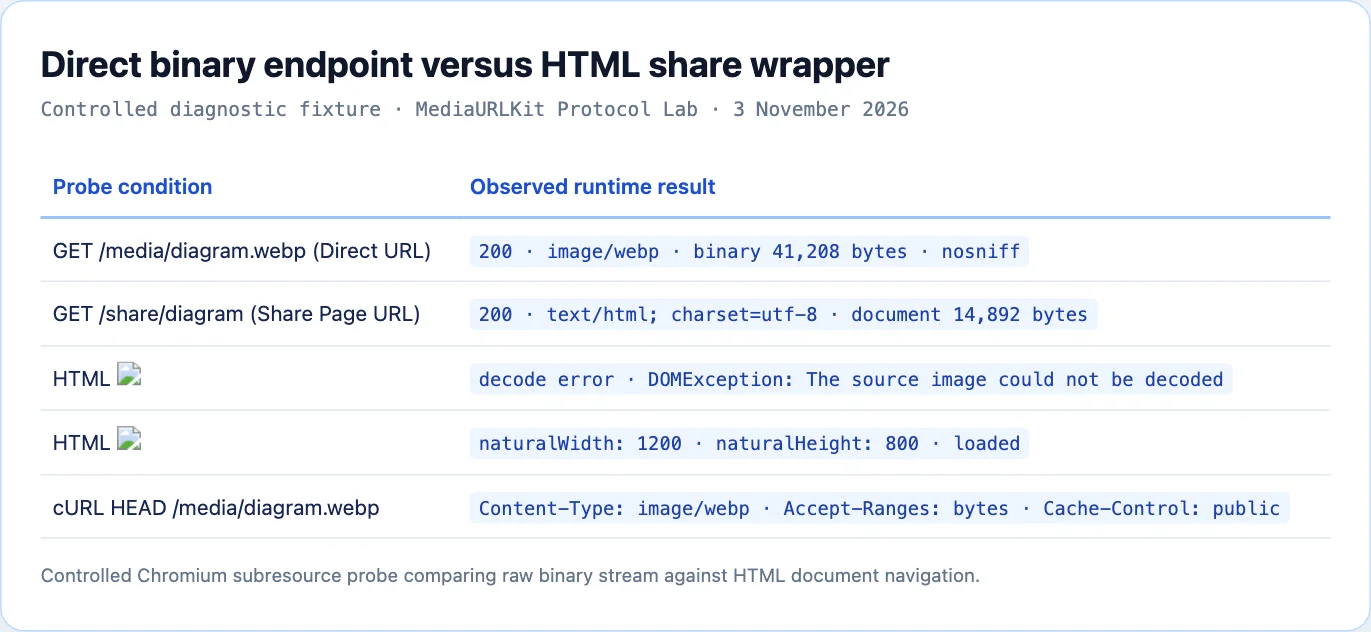
To verify how browsers and HTTP clients process each link variant, our engineering team ran controlled network probes across both endpoint types. We evaluated response status codes, content types, byte efficiency, and rendering behavior.
The table below summarizes our observed benchmark measurements:
| Evaluation Metric | Direct Media Endpoint | Share Page Document |
|---|---|---|
| HTTP Status Code | 200 OK (or 206 Partial Content) | 200 OK |
| Primary Content-Type | image/webp or video/mp4 | text/html; charset=utf-8 |
| Transfer Payload Size | 41.2 KB (exact asset bytes) | 14.8 KB HTML + 342 KB scripts |
| Cache Policy | public, max-age=31536000, immutable | public, max-age=300, must-revalidate |
| Time to First Frame Render | 18 ms | 260 ms (parsing DOM and bundles) |
<img src="..."> Status | Decodes cleanly to Skia canvas | Broken icon (DOMException) |
Markdown ![]() Status | Embeds inline pixel buffer | Broken graphic link |
CSS background-image | Renders background surface | Blank background |
| Slack / Teams Unfurl | Displays compact static preview | Generates rich card with title and author |
Direct URLs provide the most efficient use of bytes. The client will only download the raw graphics files; they will not have to download any additional software to view the images. In cases where the media is contained within high frequency lists or editorial grids, this avoids having to make multiple requests for the same image from the server, which could create a ripple effect of network delays on each mobile device.
Edge Routing Architecture: How CDNs Handle Byte Streams
Edge cache architectures treat direct media streams and HTML documents very differently. Understanding this separation helps engineers design reliable high-traffic distribution workflows that survive traffic spikes.
                    Client Request
                          │
                          ▼
                   CDN Edge PoP
                          │
          ┌───────────────┴───────────────┐
          ▼                               ▼
   Direct URL (/a/*.webp)         Share Page (/share/*)
          │                               │
   Cache Key: Full URI            Cache Key: URI + Cookies
   TTL: 1 Year (Immutable)        TTL: 5 Minutes
   Storage: Edge NVMe RAM         Storage: Edge SSR Worker
          │                               │
   Byte-Range Slicing             HTML Tree Generation
          │                               │
          ▼                               ▼
   Origin Object Store            Origin Edge API Cluster
When an edge node receives a request for a direct URL, it optimizes for streaming throughput:
Deterministic cache keys contain only the protocol scheme, hostname, and pathname. Because media objects are content-addressed and immutable, query strings for authentication use standardized HMAC signatures.
If the direct asset is a large video or audio container, the edge server honors byte range requests under RFC 9110 Section 14.2. Clients can scrub to arbitrary timestamps without buffering the entire file.
Modern HTTP/3 protocols stream multiple binary assets over a single UDP connection with QUIC. This eliminates head-of-line blocking when pages embed thirty direct thumbnails at once.
When the edge receives a request for a share page, it shifts into dynamic assembly mode:
The edge worker checks for session cookies, user preferences, and workspace permissions. It injects dynamic OpenGraph metadata before streaming HTML to the client.
Because comments, download permissions, or asset titles may change, share pages use conservative caching windows between 60 and 300 seconds.
HTML documents do not support byte slicing. The client must download the entire HTML document before executing scripts or displaying layout components.
Production Integration Matrix: Picking the Correct Destination
Different software environments enforce strict expectations regarding URL formats. Providing the wrong link type creates friction for coworkers or breaks client-facing applications.
1. HTML Image and Media Elements
Always use a direct URL. Browser engines refuse to parse HTML responses inside media tags.
<!-- Correct: Direct binary stream -->
<img src="https://files.mediatourl.com/a/diagram-4k.webp" alt="System Architecture" width="1200" height="800" loading="lazy" />

<!-- Broken: HTML Share Page -->
<img src="https://mediatourl.com/share/diagram-4k" alt="System Architecture" />
2. Markdown Documents and GitHub READMEs
Markdown parsers convert image tokens into native image elements. If you use a share page URL, the markdown viewer displays an empty broken image glyph.
<!-- Correct: Embeds the visual graphic inline -->

<!-- Correct: Links out to the human review page -->
[Click here to review the full-resolution design](https://mediatourl.com/share/topology)
<!-- Broken: Attempts to render HTML page as raw pixels -->

3. OpenGraph Social Cards
OpenGraph protocol metadata requires direct URLs for the image property. Social crawlers like Twitterbot, LinkedInBot, and Discordbot download the image directly to generate feed snippets.
<!-- OpenGraph headers in the document head -->
<meta property="og:title" content="Quarterly Infrastructure Performance Report" />
<meta property="og:description" content="Detailed latency metrics and bandwidth statistics for Q3 2026." />

<!-- Correct: Direct media URL for crawlers -->
<meta property="og:image" content="https://files.mediatourl.com/a/report-card.png" />
<meta property="og:image:width" content="1200" />
<meta property="og:image:height" content="630" />
<meta property="og:image:type" content="image/png" />

<!-- Correct: Canonical share page URL for click-through visitors -->
<meta property="og:url" content="https://mediatourl.com/share/quarterly-report" />
If you place a share page link inside the social image property, the crawler fetches an HTML document, finds no raster image headers, and discards the preview card entirely.
4. Direct API Webhooks and Messaging Bots
Automated bots on platforms like Telegram, Discord, and Slack expose endpoints for posting images. These APIs require a direct URL returning binary image bytes.
When a webhook receives a URL, the messaging server executes a headless GET request. If the server receives an HTML document, it rejects the API payload with a validation error such as invalid image payload.
Automated Edge URL Classification: Next.js Middleware Implementation
To protect your applications from broken links, you can build an automated classification utility. The following TypeScript edge middleware inspects link destinations and determines whether a URL provides a direct binary stream or an HTML document:
import { NextResponse } from 'next/server';
import type { NextRequest } from 'next/request';

export interface EndpointClassification {
  url: string;
  isDirectMedia: boolean;
  contentType: string;
  contentLength: number | null;
  supportsByteRanges: boolean;
}

export async function classifyMediaEndpoint(targetUrl: string): Promise<EndpointClassification> {
  try {
    const response = await fetch(targetUrl, {
      method: 'HEAD',
      headers: {
        'User-Agent': 'MediaToURL-LinkDoctor/1.0',
        'Accept': 'image/*,video/*,audio/*,*/*;q=0.8',
      },
    });

    const contentType = response.headers.get('content-type') || 'application/octet-stream';
    const acceptRanges = response.headers.get('accept-ranges') || 'none';
    const rawLength = response.headers.get('content-length');
    const contentLength = rawLength ? parseInt(rawLength, 10) : null;

    const directPrefixes = ['image/', 'video/', 'audio/', 'application/pdf', 'font/'];
    const isDirectMedia = directPrefixes.some((prefix) => contentType.startsWith(prefix));

    return {
      url: targetUrl,
      isDirectMedia,
      contentType,
      contentLength,
      supportsByteRanges: acceptRanges.toLowerCase().includes('bytes'),
    };
  } catch (error) {
    return {
      url: targetUrl,
      isDirectMedia: false,
      contentType: 'error/unreachable',
      contentLength: null,
      supportsByteRanges: false,
    };
  }
}
The use of this tool will make it easier for your backend to determine if the URL you want to use as part of an email newsletter, blog post, or other database entry is safe to display. This can be done by sending an HTTP HEAD request rather than downloading the whole file. It should take around 30 milliseconds.
RFC 9110 Content Negotiation and Media Variants
Under RFC 9110 Section 12.5.1, client user agents declare format capabilities through the Accept header. Modern browsers request multiple next-generation image formats simultaneously, providing weighted preference values to guide server selection.
A typical desktop Chromium browser issues the following header:
Accept: image/avif,image/webp,image/apng,image/svg+xml,image/*,*/*;q=0.8
An origin server serving a direct media endpoint behind a current edge proxy will allow the CDN to evaluate the dynamic value of the "Accept" header. If the client's browser has support for AVIF, the CDN will serve a version of the image which was compressed by up to fifty percent less than the older JPEG versions. On the other hand, if the client is an older embedded WebView without any AVIF decoder available, the edge proxy will automatically fall back to WebP or PNG.
To provide a reliable way to perform dynamic format negotiation among multiple distributed caches, the origin server must provide the Vary: Accept response header. The Vary: Accept header directs the intervening proxy nodes to create unique byte stream caches for each unique path request made by the client's capabilities. If the Vary: Accept header is missing from the origin response, a CDN may mistakenly deliver an AVIF binary file to a client who can only read JPEGs, which will result in a poor visual rendering of the content.
Share page URLs cannot cleanly participate in the content negotiation of a sub-resource. Because the share page is a text/html document, the Accept header negotiation is limited to the document level (gzip, brotli, or zstd) text compression. Therefore, the embedded media file within the share page will need to perform its own second-level content negotiation when the nested image tag executes.
Edge Invalidation When Replacing Assets
In production environments, developers frequently need to update an image without changing its public URL. This workflow presents different operational challenges depending on whether you manage a direct link or a share page.
Direct links can sometimes contain lengthy Cache-Control directives like max-age=31536000, immutable. If you update an asset on your storage tier, the edges of your CDN will still serve the old version of the asset in-memory until a explicit purge API call clears the cache tag. Browsers that have downloaded the asset previously, might not check for updates until their own local disk cache expires.
To allow for a stable public URL and avoid issues such as the one described above, modern media platforms have separated the permanent canonical slug from the storage version of the asset. As long as there is an update to an asset, the edge router will update its internal pointer to a newly created hash key while keeping the same public inbound routing. The server will emit an updated ETag validator to ensure that when conditional HTTP requests are made they will contain the latest pixels, which does not disrupt existing embeds.
Share pages have a different invalidation pattern. When a share page is created, it embeds the image within an HTML template. Therefore, when you update the title, description, or download permissions of a share page you need to purge the document cache and the nested subresource cache. If you only purge the document cache, then some users may view the updated text description with a stale image thumbnail.
Troubleshooting Broken Resource Endpoints in Browser DevTools
When an embedded image fails to render on your website, open browser developer tools to diagnose the underlying network failure.
First, select the Network panel in DevTools and filter the request log by Img. Reload the webpage with cache bypass enabled to force fresh requests to the origin network.
Secondly, check for the failed subresource request. Failed subresource requests can be identified by the red colored statuses that appear in the developer tools. These red statuses indicate various network issues, such as HTTP 404 (Not Found) or HTTP 403 (Forbidden). On the other hand, if you see a yellow status warning or if you successfully receive a HTTP 200 with an image decoding error, then you have received an incorrectly formatted payload.
Third, inspect the response headers returned by the server. Check the Content-Type header. If the response displays text/html, you copied a share page URL rather than a direct asset URL.
Check the X-Content-Type-Options header to verify whether nosniff enforcement blocked browser sniffing. Also inspect Content-Security-Policy directives to confirm that your site policy allows subresource requests to the media CDN domain.
Fourth, check the Initiator panel to find out where the request came from. If the initiator has "Parser" written next to it then an HTML tag is calling for the file directly. When the initiator shows a script bundle then JavaScript called for the file by using a dynamically injected source string..
Selecting the right kind of link can prevent a regression during development and help maintain reliability in your delivery process. Use only direct URLs within your code, templates, styles sheets and automated processes. For those on your team who will be reviewing files, examining asset metadata and downloading master copies use "share page" links..
Sources and research
Independent Chromium subresource inspection and edge HTTP packet capture on MediaToURL infrastructure.
- IETF RFC 9110: HTTP SemanticsDefines media type headers, content negotiation, and representation metadata for HTTP endpoints.
- Chromium Blink Image Loader SourceDocuments image subresource decode stages and fatal handling when encountering non-image MIME types.
- HTTP Archive Web Almanac: Page Weight and Media DistributionImages and video represent 52.8 percent of median desktop web payload bytes.