PRACTICAL ENGINEERING WORKFLOWS

Eleven workflows for the files teams share every day.

These guides begin with the issues that teams must resolve: Git history, unrendered images, stale caches, ambiguous permissions and previews that differ depending on which tool is used. Every guide includes examples of steps teams can take to verify these issues and provides options for how to handle links to media. The hosted delivery of MediaToURL is currently being prepared for release; the examples demonstrate how teams may design their workflows around a production-ready environment.

Developers & Open Source Maintainers

1. GitHub READMEs & Open Source Documentation
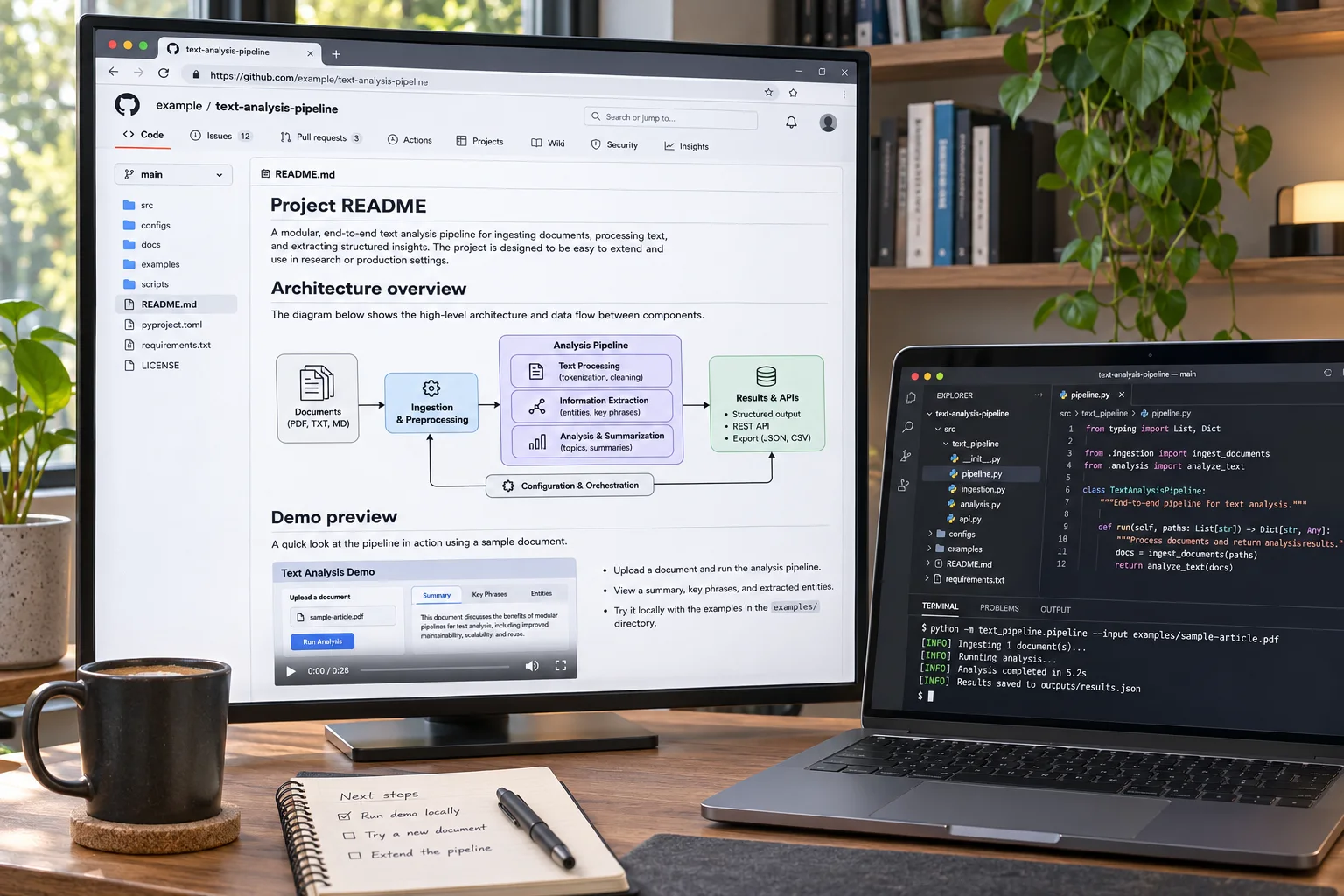
A project README with a rendered architecture diagram beside a developer laptop and terminal
A rendered architecture diagram helps explain the project without placing non-build media in Git history.
The Pain Point & Bottleneck

A screenshot or a video of a demonstration may be helpful within your README file, however it is not directly related to building the project. When you replace a large GIF file with another one in the future, the original file will remain in the history of the repository since Git saves all files as binary objects. Therefore, repositories with many files will have larger sizes for fetching and cloning. Git Large File Storage (LFS) allows you to move large files outside of standard Git objects, however, contributors and downloaders of archived versions of the project will need to find a way to work around these "pointers."

The Workflow Pattern

Separate assets used during the process of building and/or testing your project from those that exist solely as visual examples. Ensure all files essential to reproduction are kept within your repository, or via Git LFS. For images used in READMEs and/or previews of demos that will be loaded remotely, use a publicly accessible media URL so they can be viewed outside of a local copy. Using a URL that continually references the current version of an image is helpful, however, when referencing an image as part of release documentation that requires stability, a version-controlled path may be more appropriate.

Implementation Steps:
  1. 1Mark each image or recording as build-critical, release evidence, or documentation-only.
  2. 2Keep build-critical assets in Git or Git LFS; move only documentation-only media to a hosted URL.
  3. 3Add the URL with descriptive alt text and a caption that explains what the reader should notice.
  4. 4Open the README while signed out and check that the image still loads from a fork or archive workflow.
Architecture Pro-Tip: A remote README image is a live dependency: if its host is unavailable, the explanation disappears. Keep a tagged copy for release evidence or offline guides, and use a mutable URL only when the newest approved visual is what readers should see.
Markdown (README.md)Illustrative Example
<!-- Embed in your README.md without repo bloat -->
# Antigravity Media Engine

## Architecture Overview
![Architecture Diagram](https://cdn.example.com/docs/architecture-v2.png)

## Interactive CLI Demo
![Terminal Walkthrough](https://cdn.example.com/docs/cli-recording.gif)

> [!NOTE]
> Replace the example host with your published asset URL. Keep files needed for builds or offline use in Git or Git LFS.

Email Marketers & Growth Engineers

2. HTML Newsletters & Marketing Campaigns

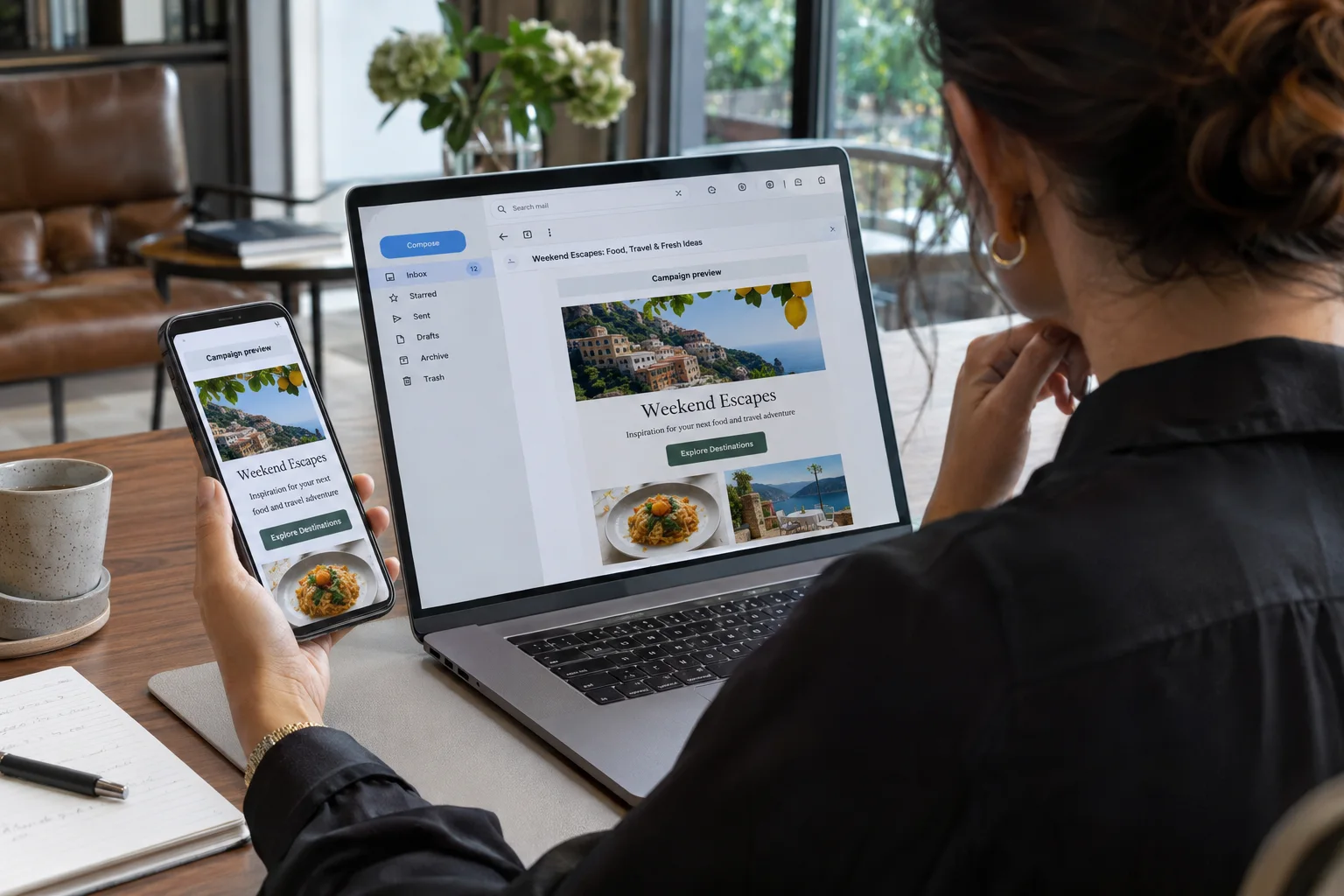
A marketer checking the same email campaign on a laptop and phone
Check both desktop and mobile rendering, and keep important campaign copy in text.
The Pain Point & Bottleneck

A photo which appears good in a browser may appear poorly in an e-mail, since the message client can possibly restrict remote content, utilize an alternative redirect, or present a previously saved version of the photo. Additionally, a cloud drive sharing page is distinct from a URL to a photo file. When a remote image is concealed, the template also requires helpful text. There is no one specific URL format that ensures all inboxes will view a photo.

The Workflow Pattern

Use a publically accessible HTTPS image url, which serves the image directly as such, and ensures it is delivered using the correct media type. Additionally, ensure your email remains legible even if the image does not load. Do not rely on images alone to deliver critical information such as prices, dates, or instructions. Instead, provide this information via html text so users can access it regardless of whether they are able to view images. Images should primarily be used for illustrative purposes.

Implementation Steps:
  1. 1Export a lightweight image in a format supported by the email clients your audience uses.
  2. 2Check that the HTTPS URL opens the file without a login page or an HTML preview wrapper.
  3. 3Add descriptive alt text, a sensible display width, and a separate text link for the action.
  4. 4Send test messages to the clients your team supports, with remote images both enabled and blocked.
Architecture Pro-Tip: Do not make a campaign depend on an image pixel to communicate its message or measure every open. Mail services can proxy, cache, or block remote images, so put the offer and destination in ordinary text and judge delivery with more than image-load signals.
HTML Email Table TemplateIllustrative Example
<!-- Direct banner link for Klaviyo, Mailchimp, or custom HTML email -->
<table role="presentation" width="100%" border="0" cellpadding="0" cellspacing="0">
  <tr>
    <td align="center" style="padding: 24px 0;">
      <a href="https://yourbrand.com/launch" target="_blank">
        <img src="https://cdn.example.com/campaigns/newsletter-header.png"
             alt="Fall Product Launch Keynote" 
             width="600" 
             style="display:block; width:100%; max-width:600px; height:auto; border:0; outline:none;" />
      </a>
    </td>
  </tr>
</table>
E-Commerce Merchandisers & Store Operations

3. E-Commerce Product Catalogs & CSV Batch Ingestion

A merchandiser reviewing product images and catalog import status on a monitor
A small import sample can reveal broken URLs or product-image mismatches before a full catalog update.
The Pain Point & Bottleneck

A catalog CSV file can be properly formatted and syntactically correct, yet individual image rows can fail to load because of issues such as an incomplete URL address; a requirement to use a login cookie; pointing to a preview page; or being associated with the incorrect product handle. Since importers download image URLs from their server and not from the browser in which the user created the spreadsheet, "it opens for me" does not represent a full verification process.

The Workflow Pattern

Treat the image column as data to validate. Use complete, publicly accessible HTTPS file URLs formatted correctly for the store importer; maintain product/variant mapping; and run a test on a small sample prior to updating your entire catalog. You may use hosting to store all of your files in one place, however, the store retains control over the CSV schema and import validations.

Implementation Steps:
  1. 1Download the current CSV template and confirm which columns hold image URL, alt text, handle, and image position.
  2. 2Use a full HTTPS URL for each image and confirm it can be fetched without cookies or a signed-in session.
  3. 3Import one product with its variants and multiple images, then check both the admin record and storefront.
  4. 4Run the full import only after confirming row order, image mapping, and any importer warnings.
Architecture Pro-Tip: Test the exact image URL from a clean browser session or an HTTP client. If packaging changes, decide whether existing product pages should show the new art everywhere; use a versioned path when an older campaign or marketplace export must preserve its original image.
CSV Product Export SampleIllustrative Example
Handle,Title,Body (HTML),Vendor,Type,Tags,Image Src,Image Position,Image Alt Text
wireless-earbuds-pro,"Earbuds Pro","<p>Noise cancelling</p>",Brand,Audio,Audio,"https://cdn.example.com/catalog/earbuds-pro-white-hero.jpg",1,"Front hero shot"
wireless-earbuds-pro,"Earbuds Pro","<p>Noise cancelling</p>",Brand,Audio,Audio,"https://cdn.example.com/catalog/earbuds-pro-case-open.jpg",2,"Open charging case"
QA Engineers & Technical Support

4. QA Bug Reporting & Issue Trackers

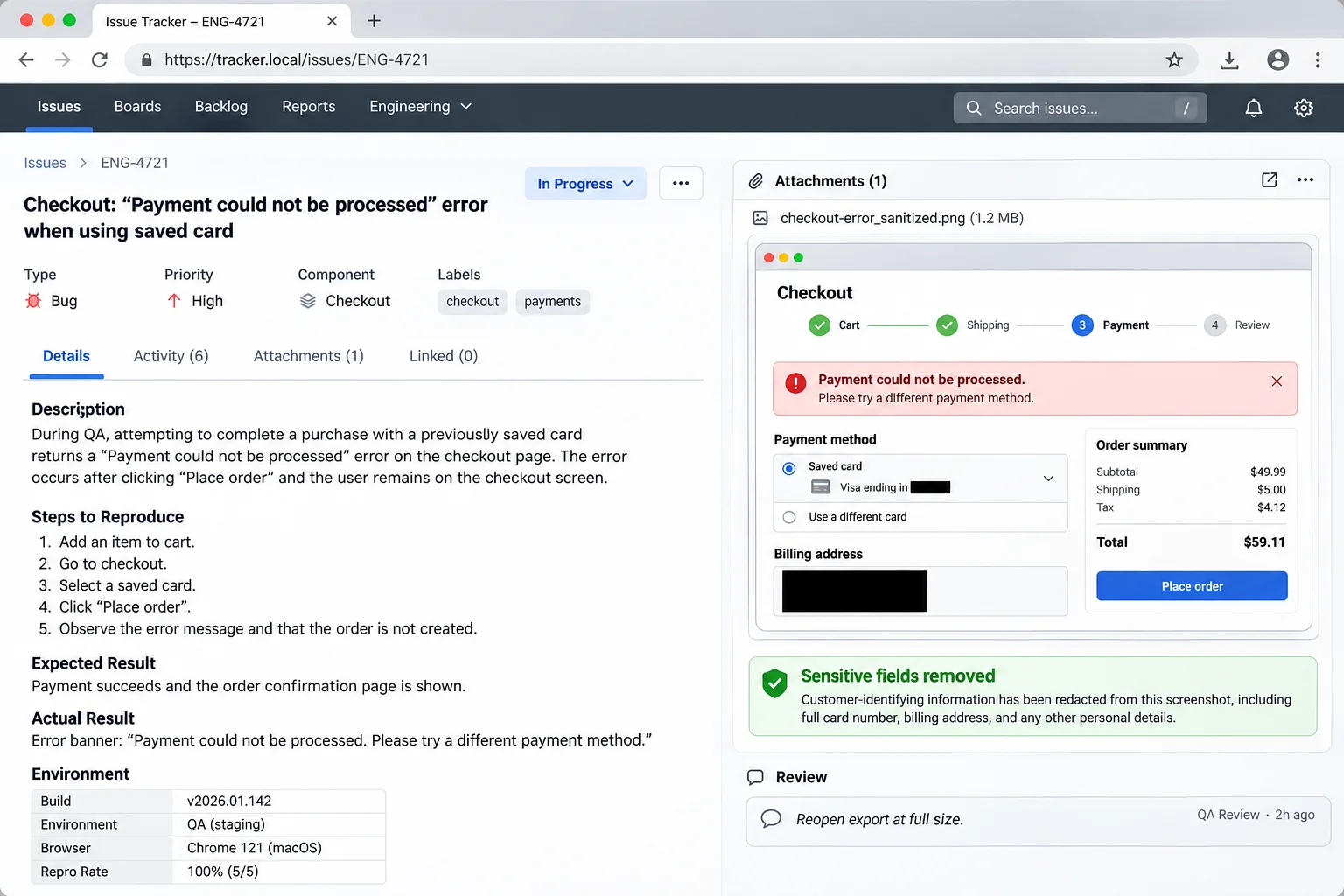
A bug report with an attached checkout screenshot and sensitive payment details covered
Sanitize screenshots before they enter issue trackers, where they may be retained and forwarded.
The Pain Point & Bottleneck

A screenshot with no context on the page state, expected outcome, or reproduction steps will make confirming a bug more challenging. On the other hand, the exact same mistake could be equally expensive: your browser tabs, customer names, emails, access tokens, and other session details may find their way into the evidence you copy into a ticket or chat.

The Workflow Pattern

Capture only what is necessary to display the problem, delete any personal or private data from the device prior to sending it, and attach the image using the accepted access model for the issue tracker. In addition, provide short reproduction steps with the image, so that the image enhances the report, rather than replacing it.

Implementation Steps:
  1. 1Record the affected screen and note browser, environment, and the action that triggered the issue.
  2. 2Crop unrelated tabs and redact private data in a local editor before creating an external copy.
  3. 3Write expected behavior, actual behavior, and the shortest reliable reproduction sequence.
  4. 4Attach the sanitized image using the tracker’s permissions, then verify the intended teammates can open it.
Architecture Pro-Tip: Use an opaque redaction that removes the pixels, not a translucent blur or movable overlay. Reopen the exported image and inspect it at full size; a hidden layer or incomplete crop can leave the original token in the file.
Markdown (Linear / Jira / GitHub)Illustrative Example
### Bug Description
Unhandled runtime exception thrown when customer applies expired coupon during checkout.

### Steps to Reproduce
1. Add item to cart and proceed to `/checkout`.
2. Input discount code `EXPIRED-2024` and submit.
3. Network tab returns 500 Internal Server Error without user-facing toast.

### Visual Trace & Console Proof
![Sanitized checkout error](https://cdn.example.com/qa/checkout-error.png)
Technical Writers & Operations Leads

5. Notion, Confluence & Internal Knowledge Bases

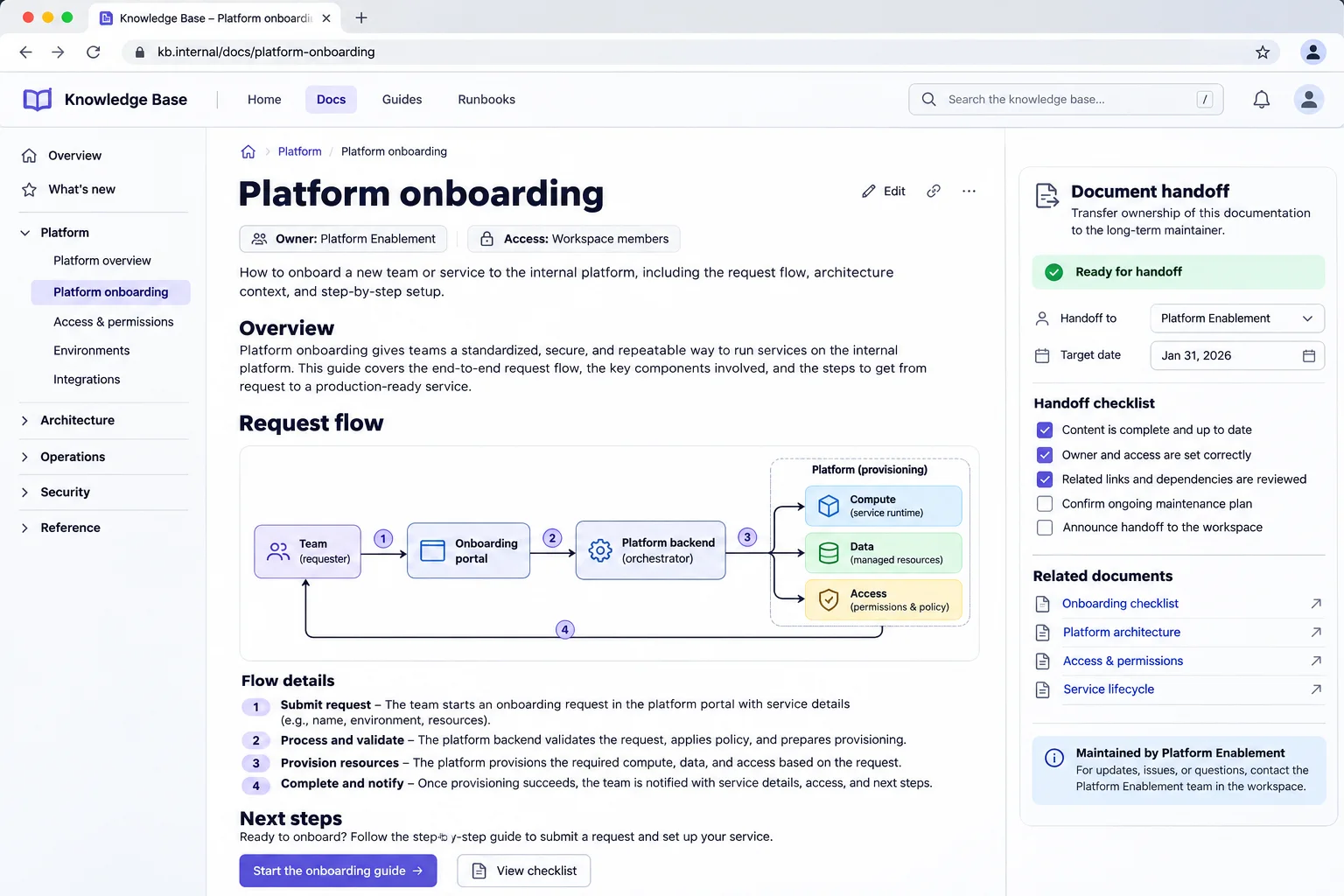
An internal platform onboarding article with an architecture diagram and document handoff checklist
Match the embedded file’s access rules to the wiki audience, then name an owner for later updates.
The Pain Point & Bottleneck

A single wiki page may have restricted access, while a linked image/PDF may have less restricted access—and vice versa (i.e. someone may be able to view the page, but not access the linked file). Shared drive links can also become broken if the owner of the drive changes or the drive is reorganized; this results in a procedure with an empty preview and no obvious contact person to inquire about fixing it.

The Workflow Pattern

Choose the file's access method prior to embedding. Utilize the wiki's built-in attachment feature or an organization-approved secure file service if your readers need to receive team permission levels. Utilize a stable direct URL for content that will be accessible to this audience. Create a caption and identify the document owner so future editors understand what the embedded content is intended for.

Implementation Steps:
  1. 1Decide whether the file is internal-only, broadly shared, or safe for anyone with the URL.
  2. 2Store it in the system whose permissions and retention rules match that decision.
  3. 3Embed the image or PDF using the wiki’s supported block and add a descriptive caption or link label.
  4. 4Test the page as a normal reader, not only as its owner, and record who should update the file later.
Architecture Pro-Tip: A PDF viewer can expose the whole document even when the wiki shows only one page in its preview. If readers should see only a selected excerpt, export that excerpt as a separate file instead of relying on the embed crop.
Wiki Handoff ChecklistIllustrative Example
Page: Onboarding architecture
File: https://cdn.example.com/internal/onboarding-architecture-v3.png
Access: Approved for workspace members
Owner: Platform Enablement
Reviewed: 2026-11-07

Embed the file with the wiki's native image or PDF block. Keep restricted files
in the wiki or file service that enforces the same audience permissions.
UI/UX Designers & Frontend Developers

6. Figma & Design System Asset Handoff

A designer and developer reviewing approved asset exports and theme variants together
Record the source, dimensions, variants, and approval state alongside each exported asset.
The Pain Point & Bottleneck

A handoff may break down after exporting components. For example, if you are missing component names, expected sizes, dark-mode variants, or approval statuses, engineers may not know what PNG to use out of many. While sharing a URL can be a convenient way for people to review your work, it cannot substitute for the original design file and does not show what was approved.

The Workflow Pattern

Exporting is treated as releasing an artifact with a short documentation (source frame, intended use, size/dimensions, format, alt-text and version). Assets used during development/testing should remain within the code repository. For reviews, the goal is to provide a live preview URL, while marketing assets would have their own URL to allow for independent updates.

Implementation Steps:
  1. 1Confirm the exact Figma frame and approval state before exporting.
  2. 2Export the intended density, dimensions, color variant, and format; name the file so its purpose is clear.
  3. 3Decide whether the asset belongs in the build repository or should be delivered independently from a media host.
  4. 4Share the source frame, asset version, alt text, and display size with the implementation ticket.
Architecture Pro-Tip: Do not let a preview URL become the only record of a design decision. Keep the source frame and an approved export together, and use a versioned path if a code review or release needs to reproduce the same visual later.
Next.js Component ReferenceIllustrative Example
// In your React / Next.js Component
import Image from 'next/image';

export function FeatureHero() {
  return (
    <section className="relative overflow-hidden rounded-2xl bg-slate-900 p-8">
      <Image 
        src="https://cdn.example.com/design/hero-mockup-v3.webp"
        alt="Interactive Dashboard Preview" 
        width={1200} 
        height={675}
        priority
        className="rounded-xl border border-slate-700 shadow-2xl"
      />
    </section>
  );
}
Community Managers & Content Creators

7. Discord, Slack & Forum Rich Video Unfurling

Two teammates reviewing a short screen recording and timestamp note on a laptop
A focused clip with a timestamp gives collaborators useful context without a long recording.
The Pain Point & Bottleneck

A short screen recording can provide more context than a long written description. However, the size of files that can be sent in a chat window; whether or not users have permission to use screen recordings in their workspace; and how screen recordings appear when viewed in the preview window vary depending upon which tool is used and the type of subscription to that tool. If the screen recording has been compressed significantly, it will likely be difficult to read code or interface labels. Also, if you create a public video link from your screen recording, it could allow people outside of your work group to view the recording.

The Workflow Pattern

Cut down the recorded video to where the decision was made or when the issue occurred. After doing so, select whether you want to upload the file to your workspace directory (workspace-native) or provide a link for others to view without giving them greater access. While direct media URLs can allow for video playback in certain applications, rich preview features are determined by the chat client and its fetch engine. Therefore, it is better to verify that the destination will support the type of preview you expect rather than assume that a link will result in an "unfurl."

Implementation Steps:
  1. 1Keep the relevant interaction and remove idle time; redact private tabs or notifications before export.
  2. 2Choose a codec and resolution that keep text legible without sending an unnecessarily large file.
  3. 3Use a workspace upload for internal-only evidence or a link with the intended external access level.
  4. 4Post the recording with a one-line summary and test its playback and permissions in the target chat.
Architecture Pro-Tip: Seeking depends on how the host responds to byte-range requests, and the chat client may still choose its own preview. Check that a `Range` request gets a `206 Partial Content` response and a valid `Content-Range`, then test playback in the actual client.
Chat Handoff MessageIllustrative Example
<!-- Link posted directly into Discord / Slack channel -->
Hey @engineering, here is the full reproducing screencast for the memory leak:
https://cdn.example.com/qa/memory-leak-run.mp4

Please check 00:18–00:31. The link is for the platform team only.
Preview and playback depend on the chat client and the file's access settings.
Jamstack Architects & Fullstack Engineers

8. Headless CMS & Static Site Generators (Astro, Next.js)

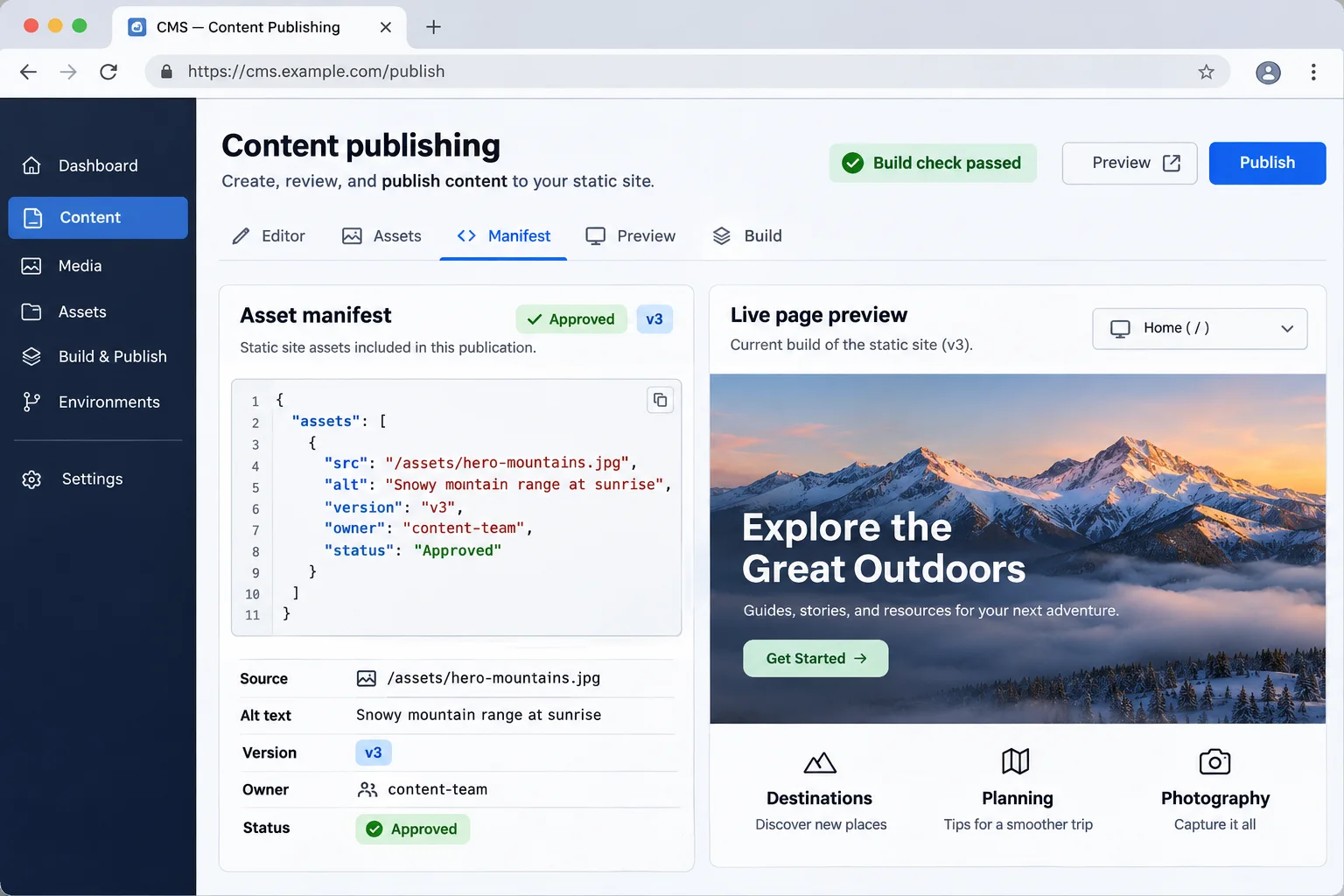
A content publishing dashboard showing an asset manifest beside a live page preview
Keep source, alt text, version, owner, and publication status visible in the asset manifest.
The Pain Point & Bottleneck

The growth of a site's media directory is often separate from the development of its application code, making coordination of reviews, deployments, and updating assets more complex. It does not necessarily simplify things when you move everything off-site to a remote server. Some frameworks will pull remote images in at build time, and a CI runner may not have the same level of access to resources that a visitor to your website has through their web browser.

The Workflow Pattern

Separation of independently changing assets from the site release will allow for the use of independent releases. However, the build inputs and releases of material should be under the same reproducible controls as the source code. An asset manifest that includes the URL of each asset, an alt text description, the owner of each asset, and the version number of each asset will enable either a CMS or static site to identify which file is needed without obscuring the dependency.

Implementation Steps:
  1. 1Sort assets into build inputs, public content media, and release-specific evidence.
  2. 2Create a small manifest that records each remote URL, alt text, owner, and version.
  3. 3Configure the framework for the exact remote host and paths it should load, if it uses an image optimizer.
  4. 4Validate remote responses in CI and test a production build when the asset host is unreachable.
Architecture Pro-Tip: For immutable production assets, content-hashed filenames make cache behavior easier to reason about. Keep a separate mutable alias only for assets whose meaning is explicitly “the latest approved version,” and document who owns that alias.
Asset Manifest ExampleIllustrative Example
// Keep content metadata beside the reference used by the site.
export const architectureDiagram = {
  src: "https://cdn.example.com/docs/cloud-architecture-v3.webp",
  alt: "Request flow from the browser through the edge cache to object storage",
  version: "v3",
  owner: "Platform Engineering",
};

// Replace the example URL with the asset host used by your project.
// Validate that host from CI before publishing the site.
Podcasters, Voice Artists & Audio Engineers

9. Audio Demos, Podcasts & Sound Design Approvals

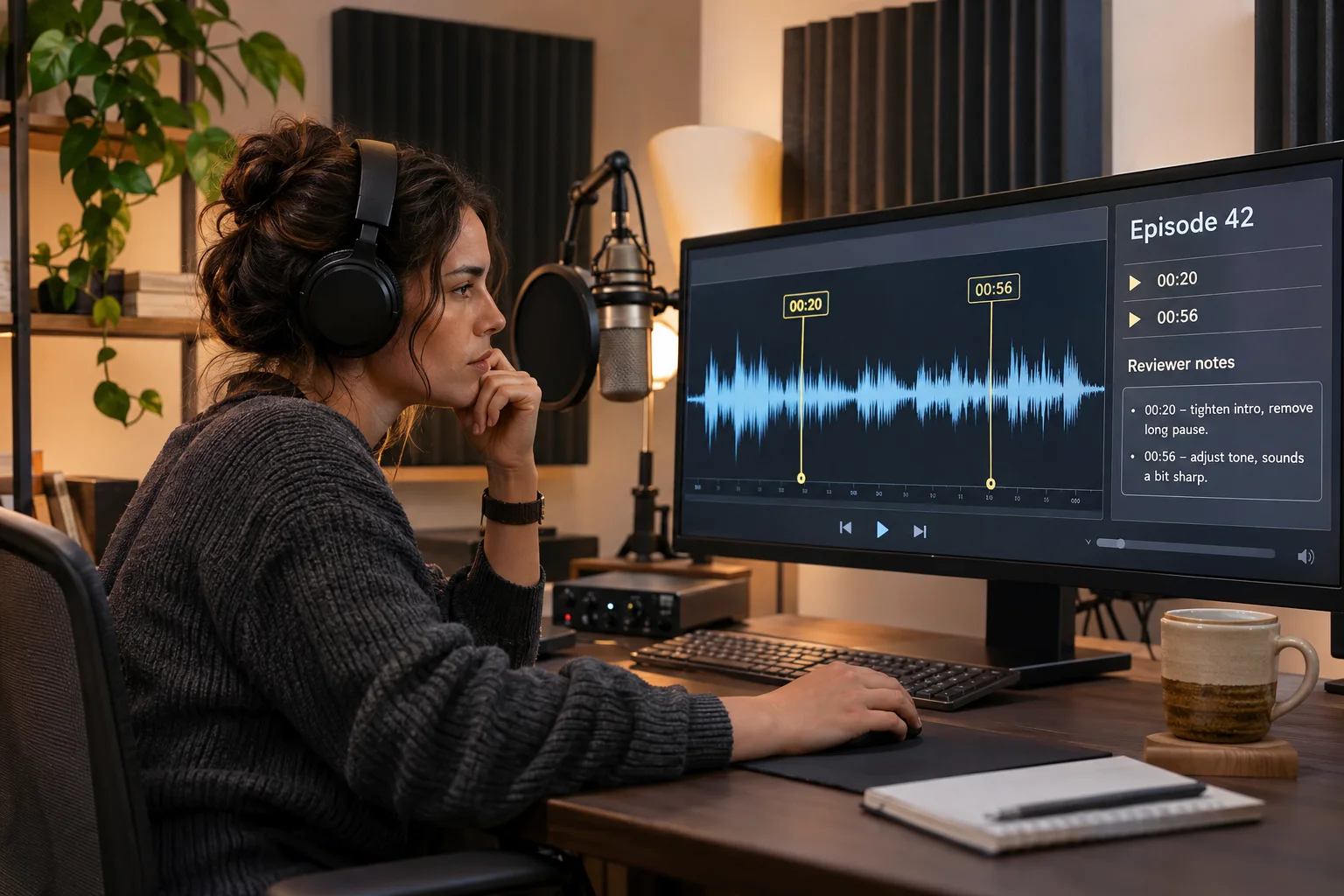
An audio producer reviewing a voice recording waveform with timestamped notes
Timestamped review notes make it clear which recording version and edit points need attention.
The Pain Point & Bottleneck

Sometimes a reviewer will want to check the timing of some lines, how the transition between them is, and a certain line being spoken without having to download a big master file or open a new account. Compression is good for making files smaller, but it could make problems sound differently in the exported version than they would if you used the highest quality export; also, a private platform might block your client's device or network.

The Workflow Pattern

Create a clear labeled review copy, utilize a player or delivery service the listener can access, keep your master copy separate, advise reviewers as to what specific version and time frame they are reviewing, and select an appropriate setting for the recording's level of sensitivity.

Implementation Steps:
  1. 1Export a review copy and state the codec, duration, and revision in its filename or handoff note.
  2. 2Listen to the opening, ending, and requested edit points on a desktop and a phone.
  3. 3Check that the player can seek; if it uses a custom waveform, verify the host’s CORS behavior too.
  4. 4Share the version through an approved location and ask for notes tied to timestamps.
Architecture Pro-Tip: Native audio controls and a JavaScript waveform have different requirements. For seeking, test an HTTP `Range` request and confirm a `206` response; a custom waveform that fetches the file in JavaScript may also need the host to allow the page’s origin through CORS.
HTML5 Native Audio PlayerIllustrative Example
<!-- Example URL and player; seeking depends on the file host. -->
<div class="audio-player-wrapper">
  <h3>Episode 42: Production CDN Architecture</h3>
  <audio controls preload="metadata" style="width: 100%; border-radius: 8px;">
    <source src="https://cdn.example.com/audio/podcast-ep42-review.mp3" type="audio/mpeg">
    Your browser does not support the audio element.
  </audio>
</div>
Agencies, Freelancers & Design Consultants

10. Client Deliverables & Proof of Work Sign-off

A creative agency team and client reviewing approved campaign deliverables on a large display
Confirm the approved revision and use the client’s agreed access channel for delivery.
The Pain Point & Bottleneck

A client's email system can either block or quarantine an attachment, but with a public link to the document, the link can be sent to people outside of the review group. "Unlisted" does not equal "confidential", and although you can assign a password or set an expiration date for the document, this will not stop a user who has opened the document from copying it.

The Workflow Pattern

In addition, use either the client's approved portal or a delivery service that has been configured with the necessary access control features required by the project. Maintain a private source copy, clearly mark the approved version, and view each hosted link as an easy way to deliver products rather than a substitute for contractual or data loss protections.

Implementation Steps:
  1. 1Check the client agreement and classify the file before choosing how to send it.
  2. 2Prepare a review copy with a clear version label; remove notes and metadata that should not be shared.
  3. 3Use the organization-approved portal or a link with the needed expiry and revocation controls, if available.
  4. 4Send access instructions separately when required and confirm the client can open the intended version.
Architecture Pro-Tip: Do not send passwords, recovery codes, or private keys in an ordinary media link, even if it expires after one view. Use a purpose-built secrets-sharing process; an image or document can be copied once a recipient can see it.
Client Delivery Email FormatIllustrative Example
Hi Alex,

Please find the finalized Q4 Creative Campaign deliverables linked below:
• Brand Assets & Visual Guide: [link in the client-approved portal]
• Campaign Teaser Video: [link in the client-approved portal]

The files are labeled with their revision and review date. Please reply with comments
on the version you reviewed; access is managed in the approved client portal.

Best regards,
Creative Studio Operations
UI Developers & Interactive Designers

11. Standalone HTML/CSS Prototypes & Interactive Sandboxes

A developer showing a teammate desktop and mobile views of a sandboxed HTML prototype
Compare target screen sizes and keep runnable previews isolated from production credentials and cookies.
The Pain Point & Bottleneck

A quick review of the page will likely result in a short-lived tunnel to the server or a copy of the HTML document being run with greater browser privileges than anticipated. In addition to potential issues related to the use of external scripts, prototype pages may contain sensitive information such as local storage, test credentials, or sample data that resembles what a user would enter on a public origin.

The Workflow Pattern

Preview locally for early feedback on your layout, and then preview your prototype in a different, controlled environment for reviews by stakeholders. You should also serve HTML that is not trusted or created by users from a different domain than where you are serving the prototype. Lastly, you need to use the smallest possible iframe sandbox permission that your prototype requires.

Implementation Steps:
  1. 1Remove production credentials, customer data, and scripts that are not needed for the interaction being reviewed.
  2. 2Preview at the target desktop and mobile widths, and confirm the main keyboard and touch path works.
  3. 3If it must be hosted, use a separate preview origin and a sandbox that grants only required capabilities.
  4. 4Share a test-only URL, state what feedback is needed, and provide a normal link if the iframe is blocked.
Architecture Pro-Tip: For same-origin content, combining `allow-scripts` with `allow-same-origin` can let a frame remove its own sandbox restrictions. Keep the sandbox restrictive, and isolate runnable user HTML on a different origin from the application and its login cookies.
Sandboxed Iframe EmbedIllustrative Example
<!-- Embed interactive HTML prototype inside documentation or client review portal -->
<iframe 
  src="https://preview.example.net/prototypes/responsive-nav.html"
  title="Responsive navigation prototype"
  width="100%" 
  height="600" 
  style="border: 1px solid #e2e8f0; border-radius: 12px; box-shadow: 0 4px 12px rgba(0,0,0,0.05);"
  sandbox="allow-scripts"
  loading="lazy">
</iframe>

Useful details

Frequently Asked Questions about Use Cases & Workflows

Why can an image URL work in a browser but fail in email or a README?

A URL could take you to a preview page, require you to accept cookies, or provide you with something else than the actual image file. A correct public image URL can be blocked by an email client's remote-content settings, and a README will not load an asset that requires the user to log in. You should test the URL while not being logged into your own account, use a direct file response, and provide alt text so that the surrounding message is still readable even if the image does not appear.

Should I keep project images in Git or host them separately?

Keep assets in Git/LFS if the assets will be reproduced by builds, tests, offline usage, or a tagged release. If the asset does not need to be reproduced by a build process (e.g. screenshots in README, public editorial media) then you could use a hosted URL instead of Git/LFS. Be aware that an external image creates a live dependency and LFS-backed archives may require readers to pull down the LFS object before they can access the content of the archive.

How do I reduce image failures in a product CSV import?

To use the store importer's current format, provide the full, publicly accessible HTTPS image URL in the specified column. After checking for redirects (to either login pages or previews), test with a small sample of images to verify that each one was imported correctly and is associated with the correct product/variant. Store Importer's Error Report will be more beneficial to you than making assumptions about why an image may have failed to load based upon bandwidth issues or CDN problems.

Does an unlisted or expiring link make a client file confidential?

No. A private link (unlisted URL) is a "bearer" link. Anyone that has received the link can potentially view/forward the link. An expiration date will limit future viewing of the link, however, an expiration date does not remove downloads/screenshots/copies taken prior to the links expiration. When delivering confidential work product, please use your client's approved portal and access control protocols.

Why might visitors still see the old image after a replacement?

The browser, a proxy, or a CDN may be holding on to the older version of the document (response), particularly if the URL was not altered and has a long cache life. To determine if this is happening, view the response headers for each new request and/or download the document from a clean request. If you want to maintain an archival record of changes, publish a new version of the document with a distinct filename; however, if you are looking to provide readers with the most up-to-date information, either set up re-validation or replace your existing cache content with new content.

When can I use these MediaToURL workflows?

MediaToURL will have hosted delivery in the near future. The sample domain names used in these snippets are merely placeholders and do not represent active MediaToURL endpoints. Product specific instructions on how to use the MediaToURL service to upload files, as well as file size limits and who can access the files you have uploaded, will be available when MediaToURL launches.

READY TO STREAMLINE YOUR WORKFLOW?

Put the next media handoff on solid footing.

Preview and edit supported files in the browser, then use these checks to prepare the handoff for its actual destination.