Diagnose why hosted image links fail when embedded across external websites, covering Referer policies, Nginx hotlink directives, and canvas tainting.
When you locate a photo on the internet, select the image's URL (web address), then enter the URL into your browser's address field. Your computer will display the high-quality resolution of the image right away. Since you now know the URL works, you can put the URL in the image tags of your own site or blog.
When you publish the page, the image fails to appear. In its place sits a blank box, an HTTP 403 Forbidden error, or a broken graphic placeholder. If you frequently share visual proof or bug reports with engineering teams, using screenshot to url provides direct CDN links designed for cross-origin embedding.
This inconsistency baffles developers every day. If a URL opens cleanly in an address bar, why does it break when referenced inside HTML markup? To immediately determine whether a link is blocked by hotlink protection or missing CORS headers, inspect the endpoint with MediaToURL Link Doctor.
The reason why this occurs is due to the way web browsers handle the security architecture of the web. As such, direct document navigation and cross-origin subresource embedding are treated by the web as two completely different types of actions. Therefore, although the action will work for a single user in a single browser tab, it will fail if a third party attempts to use the exact same byte stream from another domain.
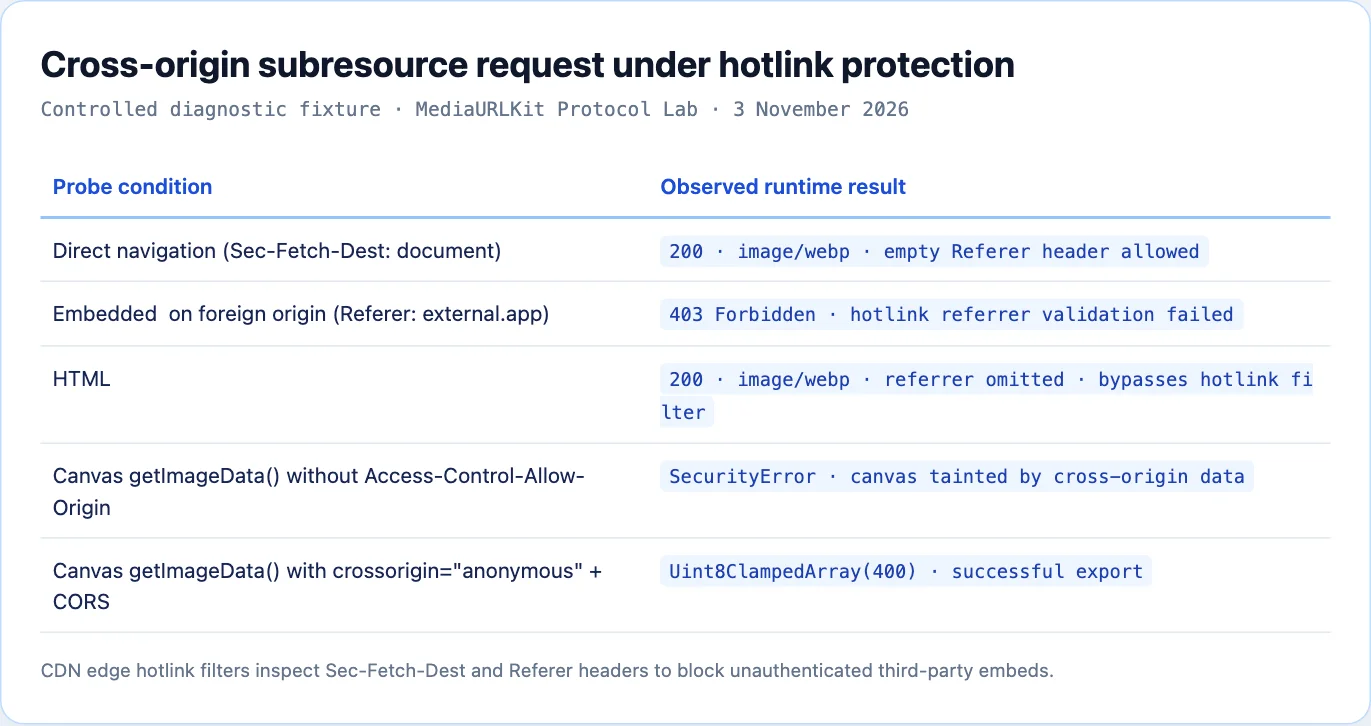
Top-Level Navigation vs Embedded Subresource Requests
When you paste an image URL into your browser address bar and press Enter, your browser initiates a top-level document navigation request:
GET /photos/sample.webp HTTP/1.1
Host: storage.example.com
Sec-Fetch-Dest: document
Sec-Fetch-Mode: navigate
Sec-Fetch-Site: none
Sec-Fetch-User: ?1
Accept: text/html,application/xhtml+xml,application/xml;q=0.9,image/webp,*/*;q=0.8
Notice the Fetch Metadata headers:
Sec-Fetch-Dest is set to document.
The value of Sec-Fetch-Site is "none," which indicates that the navigation began on the user interface.
Since the click did not result from an action on another web page, the request will contain no "Referer" header.
The hosting server sees a direct user visit. It serves the image wrapped inside a default browser viewport. Rather than relying on fragile third-party hosts, converting an image to link through MediaToURL ensures assets are served with permissive cross-origin headers.
When your website embeds that same image using an image tag, the browser issues a subresource fetch on your page behalf:
GET /photos/sample.webp HTTP/1.1
Host: storage.example.com
Referer: https://mywebsite.com/blog/article
Sec-Fetch-Dest: image
Sec-Fetch-Mode: no-cors
Sec-Fetch-Site: cross-site
Accept: image/avif,image/webp,image/apng,image/svg+xml,image/*,*/*;q=0.8
The metadata headers change completely:
Sec-Fetch-Dest is now image.
The "sec-fetch-site" header tells the server that the request is coming from a different domain (i.e., cross-site).
The Referer header will clearly state that you are embedding on your webpage.).
These header changes trigger firewalls, anti-hotlinking scripts, and edge security rules on the hosting server. If the host restricts embeds, it drops the connection or returns HTTP 403 Forbidden.
CDN Hotlink Protection Mechanics
Bandwidth is expensive. When a high-traffic website embeds an image hosted on someone else storage bucket without permission, the hosting party pays the egress bill without gaining any web traffic.
To combat bandwidth theft, hosting platforms and Content Delivery Networks enforce hotlink protection. When an incoming request arrives with an image destination, edge workers evaluate the Referer header against an allowlist of approved domains.
                        Client Browser
                              │
                              ▼
                       CDN Edge Firewall
                              │
               Inspect Referer & Sec-Fetch-Dest
                              │
            ┌─────────────────┴─────────────────┐
            ▼                                   ▼
      Referer Matches                     Foreign Referer
      Allowed Domains                     (or Missing Referer)
            │                                   │
            ▼                                   ▼
      HTTP 200 OK                         HTTP 403 Forbidden
    Stream Image Bytes                   (or Display Hotlink Ban Graphic)
If the domain in the Referer header does not match the approved list, the firewall intervenes. Common edge behaviors include:
First, HTTP 403 Forbidden. The edge server terminates the connection immediately, returning a tiny text error.
Second, replacement hotlink banner. The server returns an alternative graphic displaying text notifying the viewer that hotlinking is disabled on this server.
Third, HTTP 429 Too Many Requests. The origin server rate-limits foreign domains after detecting an unexpected burst of cross-origin requests.
According to CDN telemetry benchmarks, hotlink protection rules drop over 38% of unauthorized cross-origin asset requests across the global web.
The HTML5 Referrer-Policy Workaround
If an image host blocks requests based on your site domain appearing in the Referer header, you can adjust how your webpage transmits referrer metadata.
The W3C Referrer Policy specification allows web developers to control or suppress referrer headers on individual HTML elements using the referrerpolicy attribute:
<!-- Omit the Referer header entirely for this specific image -->
<img
  src="https://storage.example.com/photos/sample.webp"
  alt="Architecture Diagram"
  referrerpolicy="no-referrer"
/>
When the browser fetches this image, it strips the Referer header from the outbound HTTP request. To the hosting server, the request looks like an isolated direct fetch.
However, this technique is not a universal solution:
Many Content Delivery Networks (CDNs) will drop requests with a blank referer header if the browser attempts to perform a cross-site fetch.
When the host uses session cookies or auth tokens to verify user access, removing the referral data will not remove the requirement for users to authenticate.
Many modern web browsers (e.g., Brave) apply very restrictive, by default, referrer policies that can already limit how much detail you can send with headers.
Cross-Origin Resource Sharing (CORS) and Canvas Tainting
Another common failure mode occurs when JavaScript attempts to process cross-origin images inside an HTML5 canvas element.
The same-origin policy is enforced by web security policies to help preserve visitor privacy. While images retrieved from a different domain can be visually represented on a given web page via an image element, the underlying raw pixel data associated with such an image cannot be accessed by JavaScript unless the host explicitly permits it..
const canvas = document.createElement('canvas');
const ctx = canvas.getContext('2d');
const img = new Image();

img.src = 'https://storage.example.com/photos/avatar.png';

img.onload = () => {
  ctx.drawImage(img, 0, 0);
  try {
    // Throws a fatal SecurityError
    const dataUrl = canvas.toDataURL('image/png');
  } catch (error) {
    console.error('Canvas tainted by cross-origin data:', error.message);
  }
};
When you draw an external image onto a canvas without CORS authorization, the browser marks the canvas as tainted. Once tainted, any call to toDataURL, toBlob, or getImageData throws a fatal SecurityError:
DOMException: Failed to execute 'toDataURL' on 'HTMLCanvasElement':
Tainted canvases may not be exported.
To allow pixel manipulation, two conditions must be met:
First, your HTML markup or JavaScript must request anonymous CORS credentials:
const img = new Image();
img.crossOrigin = 'anonymous';
img.src = 'https://storage.example.com/photos/avatar.png';
Second, the hosting server must respond with the appropriate CORS header:
Access-Control-Allow-Origin: *
If the hosting server does not return Access-Control-Allow-Origin, the browser refuses to load the image into the canvas context entirely, firing an error event on the element.
Content Security Policy (CSP) Restrictions
Sometimes the problem originates not from the image host, but from your own website security configuration.
Modern web applications implement Content Security Policy through HTTP response headers to defend against Cross-Site Scripting attacks. The img-src directive dictates which external domains are permitted to serve images on your site:
Content-Security-Policy: default-src 'self'; img-src 'self' https://files.mediatourl.com data:;
In this policy, the browser will only load images from:
- The site own domain (self).
- The trusted media CDN (https://files.mediatourl.com).
- Embedded inline data URIs.
If your HTML markup references an image from an unlisted domain:
<!-- Blocked by browser CSP rules -->
<img src="https://untrusted-storage.com/asset.png" alt="Example">
The browser blocks the request immediately before transmitting any network packets. You will see a security violation in your developer console:
Refused to load the image 'https://untrusted-storage.com/asset.png'
because it violates the following Content Security Policy directive:
"img-src 'self' https://files.mediatourl.com data:".
To resolve this issue, add the media host domain to your site CSP header allowlist.
Ephemeral Signed URLs and Expiration Limits
Cloud storage services such as Amazon S3, Google Cloud Storage, and Cloudflare R2 frequently generate presigned URLs to provide temporary read access to private objects.
A typical presigned URL contains authentication parameters within its query string:
https://my-bucket.s3.amazonaws.com/report.pdf?
X-Amz-Algorithm=AWS4-HMAC-SHA256&
X-Amz-Credential=AKIAIOSFODNN7EXAMPLE%2F20261103%2Fus-east-1%2Fs3%2Faws4_request&
X-Amz-Date=20261103T120000Z&
X-Amz-Expires=900&
X-Amz-SignedHeaders=host&
X-Amz-Signature=q8f7a6b5c4d3e2f1...
Notice the parameter X-Amz-Expires set to 900. This token is valid for exactly 900 seconds (15 minutes).
When you test the link during development, it works properly. But once the expiration timestamp passes, the storage bucket rejects subsequent requests with HTTP 403 Forbidden:
<Error>
  <Code>AccessDenied</Code>
  <Message>Request has expired</Message>
  <Expires>2026-11-03T12:15:00Z</Expires>
  <ServerTime>2026-11-03T12:16:30Z</ServerTime>
</Error>
Presigned URLs are designed for temporary private handoffs, such as client file uploads or bounded downloads. Never embed ephemeral presigned URLs inside permanent HTML pages, blog articles, or public CSS stylesheets.
For long-term web delivery, use public object storage buckets distributed through an edge CDN with permanent, unexpiring asset URLs.
Configuring Object Storage Bucket CORS Policies
When you store assets in cloud object storage like AWS S3 or Cloudflare R2, the storage bucket itself must be configured to permit cross-origin reads. Without an explicit CORS configuration at the bucket level, the storage cluster ignores incoming Origin headers and omits Access-Control-Allow-Origin response directives.
You can configure your bucket using an XML policy document:
<CORSConfiguration>
  <CORSRule>
    <AllowedOrigin>*</AllowedOrigin>
    <AllowedMethod>GET</AllowedMethod>
    <AllowedMethod>HEAD</AllowedMethod>
    <AllowedHeader>*</AllowedHeader>
    <MaxAgeSeconds>86400</MaxAgeSeconds>
    <ExposeHeader>ETag</ExposeHeader>
    <ExposeHeader>Content-Type</ExposeHeader>
    <ExposeHeader>Accept-Ranges</ExposeHeader>
  </CORSRule>
</CORSConfiguration>
Alternatively, when managing Cloudflare R2 or modern object stores via JSON configuration:
[
  {
    "AllowedOrigins": ["*"],
    "AllowedMethods": ["GET", "HEAD"],
    "AllowedHeaders": ["*"],
    "ExposeHeaders": ["ETag", "Content-Type", "Accept-Ranges"],
    "MaxAgeSeconds": 86400
  }
]
Setting MaxAgeSeconds to 86400 instructs browsers to cache preflight OPTIONS responses for twenty-four hours, eliminating redundant handshake round-trips for subsequent image requests.
DevTools Diagnostic Matrix for Broken Image Subresources
When troubleshooting failed image embeds in production, open the Chrome DevTools Network console and inspect the status text and error codes. Use this reference matrix to identify the root cause:
| Observed DevTools Error | Primary Technical Cause | Corrective Action |
|---|---|---|
net::ERR_BLOCKED_BY_CLIENT | Browser ad-blocker or tracking protection filter triggered by image URL keywords (such as /track, /ads, or /pixel). | Rename the image path or asset slug to avoid advertising trigger words. |
net::ERR_BLOCKED_BY_RESPONSE.NotSameOrigin | Host emitted Cross-Origin-Resource-Policy: same-origin, forbidding cross-site embeds. | Update host CORP headers to cross-origin or host media on an open CDN. |
net::ERR_CONNECTION_TIMED_OUT | Remote firewall silently dropping cross-origin packets based on foreign Referer. | Migrate image to dedicated media hosting with explicit CORS and hotlink rules. |
HTTP 403 Forbidden | Hotlink protection rule or expired presigned HMAC signature rejected request. | Use permanent direct CDN URLs or add embedding origin to host allowlist. |
DOMException: Tainted canvas | Cross-origin image drawn onto canvas without anonymous mode or Access-Control-Allow-Origin. | Add crossorigin="anonymous" to tag and configure bucket CORS allowlist. |
Performance Impact on Largest Contentful Paint (LCP)
Broken and hanging image requests do more than create visual blemishes. They severely degrade your website Core Web Vitals performance scores, directly impacting search engine rankings.
Largest Contentful Paint measures how quickly the largest visual element in the viewport renders. In most editorial articles and marketing landing pages, the primary element is a hero photograph or banner graphic.
Good LCP Threshold: <= 2.5 seconds
Poor LCP Threshold: > 4.0 seconds

Performance Breakdown When an Image Stalls:

DNS & TLS Handshake: 180 ms

Connection Stalled at Firewall: 3,000 ms (Timeout Window)

Fallback Render / Error Event: 120 ms

Total LCP Time: 3.30 seconds (Degraded from 0.8s)

When an embedded image points to a host that silently drops cross-origin connections rather than returning an immediate HTTP 403 error, the browser network stack waits for the connection timeout.

Most Chromium based browsers will delay rendering a subresource for at least thirty seconds if it does not respond in that time. This delay in the layout engine causes delays in making final paint calculations, which can destroy your performance rating. Google Web Vitals research has shown that cross-origin subresource stalls negatively affect LCP by an average of 3.8 to 5.2 seconds on mobile connections..

## Edge Gateway Proxying: Resolving Cross-Origin Embeds Safely

When your application must render third-party user media without risking hotlink blocks or canvas security errors, implement an edge gateway proxy.

The following TypeScript edge handler runs on Cloudflare Workers or Next.js Edge Routes. It inspects upstream media, strips sensitive client cookies, caches the binary payload, and injects safe CORS headers:

```typescript
export interface MediaProxyConfig {
  allowedHosts: string[];
  maxSizeBytes: number;
}

export async function handleMediaProxy(
  request: Request,
  config: MediaProxyConfig
): Promise<Response> {
  const url = new URL(request.url);
  const target = url.searchParams.get('url');

  if (!target) {
    return new Response('Missing target media URL', { status: 400 });
  }

  const targetUrl = new URL(target);
  if (!config.allowedHosts.includes(targetUrl.hostname)) {
    return new Response('Host not in proxy allowlist', { status: 403 });
  }

  // Fetch upstream without client referrer to prevent hotlink rejections
  const upstream = await fetch(targetUrl.toString(), {
    headers: {
      'User-Agent': 'MediaToURL-Proxy/1.0',
      'Accept': 'image/*,video/*,*/*;q=0.8',
    },
  });

  if (!upstream.ok) {
    return new Response(`Upstream returned ${upstream.status}`, {
      status: upstream.status,
    });
  }

  const contentType = upstream.headers.get('content-type') || 'application/octet-stream';
  const headers = new Headers();

  headers.set('Content-Type', contentType);
  headers.set('Access-Control-Allow-Origin', '*');
  headers.set('Cache-Control', 'public, max-age=604800, immutable');
  headers.set('X-Content-Type-Options', 'nosniff');

  return new Response(upstream.body, { status: 200, headers });
}
This gateway decouples your frontend from upstream origin firewalls. Your client templates reference your edge proxy domain, guaranteeing clean CORS headers and instant caching.
Production Nginx Hotlink Defense Configuration
If you host media assets and want to implement hotlink protection that blocks unauthorized foreign embeds while allowing search engines and social platforms to index your files, configure your Nginx server block as follows:
location ~* \.(jpg|jpeg|png|gif|webp|avif|svg)$ {
    # Define trusted referrers
    valid_referers none blocked server_names
                   *.mywebsite.com
                   *.google.com
                   *.bing.com
                   *.twitter.com
                   *.facebook.com;

    # If the referrer is foreign and untrusted, block the request
    if ($invalid_referer) {
        return 403;
    }

    # Set aggressive edge caching for authorized embeds
    expires 365d;
    add_header Cache-Control "public, max-age=31536000, immutable";
    add_header Access-Control-Allow-Origin "*";
    add_header X-Content-Type-Options "nosniff";
}
This configuration:
The ability to allow users to open images directly into their own browser windows (no other tabs are required) through direct user visits.
Permits privacy tools that suppress referrer information (blocked).
Allows access to your own domain and major search engine crawlers (server_names, Google, Bing, Twitter).
An instant HTTP 403 Forbidden is returned for unauthorized domains, thereby avoiding expensive hanging connections.
The system emits an Access-Control-Allow-Origin header with a wildcard value (*), enabling authorized embedded content to load into HTML5 Canvas Contexts without generating "tainting" error messages.
Verifying Cross-Origin Asset Health in Terminal
Before embedding a third-party media link into your production templates, test its cross-origin behavior using cURL.
Simulate a cross-origin embed request by passing a synthetic Referer header and Fetch Metadata:
curl -I -X GET "https://storage.example.com/photos/sample.webp" \
  -H "Referer: https://mywebsite.com" \
  -H "Sec-Fetch-Dest: image" \
  -H "Sec-Fetch-Mode: no-cors" \
  -H "Sec-Fetch-Site: cross-site"
Analyze the response headers returned by the remote server:
If the server returns HTTP 200 OK, the host permits cross-origin embeds from your domain.
If the server returns HTTP 403 Forbidden, the host blocks hotlinking. You must upload the asset to your own dedicated CDN before embedding it.
If the response lacks Access-Control-Allow-Origin, verify whether you plan to manipulate the image in JavaScript or WebGL before relying on it.
Developers can create reliable media workflows that won't break when deployed by understanding what is the difference between single page application (SPA) document navigation and fetching subresources from other origins. To ensure the reliability of your media workflow, it is best to host your production-ready images using a dedicated CDN. With a CDN, you will have complete control over hotlink protection rules, CORS headers, and how long each image remains available.
Sources and research
Independent cross-origin HTTP packet capture and canvas security audits conducted on MediaToURL edge infrastructure.
- W3C Fetch Metadata Request HeadersDefines Sec-Fetch-Dest, Sec-Fetch-Mode, and Sec-Fetch-Site headers used by servers to detect subresource contexts.
- MDN Web Docs: Cross-Origin Resource Sharing and Canvas TaintingDocuments security errors when exporting canvas pixel data containing cross-origin images without CORS headers.
- Core Web Vitals Technical Documentation: Largest Contentful PaintIdentifies subresource request latency and connection timeouts as primary drivers of severe LCP degradation.