Identify whether the embedding page, PDF response, redirect, or browser viewer is responsible for a blank PDF iframe.
A support page links to a PDF that opens in a new tab, but the document area inside the page stays empty. When embedding PDF documents into web pages, use pdf to link to configure permissive framing and inline presentation headers. The link proves that a top-level navigation can reach something useful. It does not prove that the same resource permits framing, that the embedding page permits the URL, or that the viewer can render it in that context. A blank rectangle is a symptom shared by several layers.
Begin with the browser console and the iframe's Network request. One explicit policy error is more informative than changing iframe width, src, CORS settings, and server headers at the same time. Keep the direct-open link available while investigating, because it gives the reader a path to the document even if an external host does not allow embedding.
Two sides can refuse the frame
The embedding page can send a Content Security Policy with frame-src that restricts the URLs it may load. The PDF response can send frame-ancestors to specify which pages are allowed to embed it. The PDF response can also send X-Frame-Options: DENY or SAMEORIGIN. These policies have different owners. MDN documents the parent-side frame-src, the child-side frame-ancestors, and X-Frame-Options.
| Evidence | Likely owner to inspect |
|---|---|
Console says the page's frame-src policy refused the URL | The embedding site's response policy |
Console says frame-ancestors refused the ancestor | The final PDF response or its delivery proxy |
Final PDF response has X-Frame-Options: DENY | The PDF server or intermediary |
| No policy error, iframe is zero height or hidden | The page's layout and iframe markup |
Do not remove a security header as a general cure. A billing statement, private report, or authenticated document may intentionally prohibit framing to reduce unwanted reuse or clickjacking risk. If you control both sites and embedding is a real product requirement, set a narrowly chosen policy for the intended parent. If the document belongs to a third party, their frame policy is theirs to decide. Your page cannot override it with a meta tag or an iframe attribute.

A controlled denied-frame example
We created a one-page local PDF and served it with Content-Type: application/pdf and X-Frame-Options: DENY. Chromium 156 could fetch the document URL with status 200, while the iframe remained blank. The response carried a documented frame-denial header, though this run did not capture a specific policy console message. The screenshot shows the actual iframe and response-header probe on a loopback page. This is an HTTP policy demonstration, not evidence about any third-party PDF host.
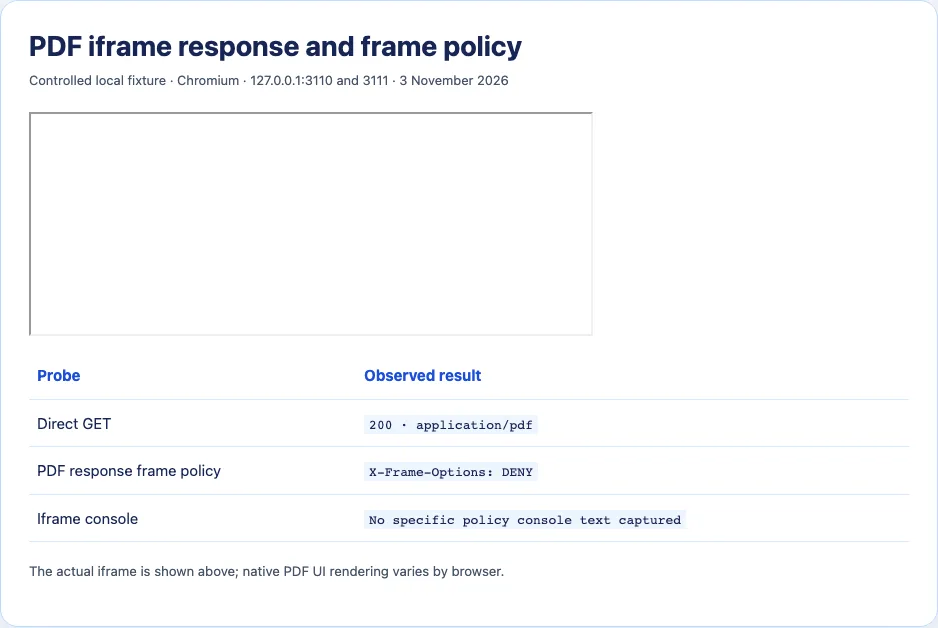
The key observation is that a successful GET is compatible with a failed embed. The response's right to be viewed at the top level differs from its permission to appear inside another page. This is why opening the file URL separately is a useful control, but never a complete embedding test. The result also does not show that all blank PDF frames are policy failures; the next checks matter when no policy error appears.
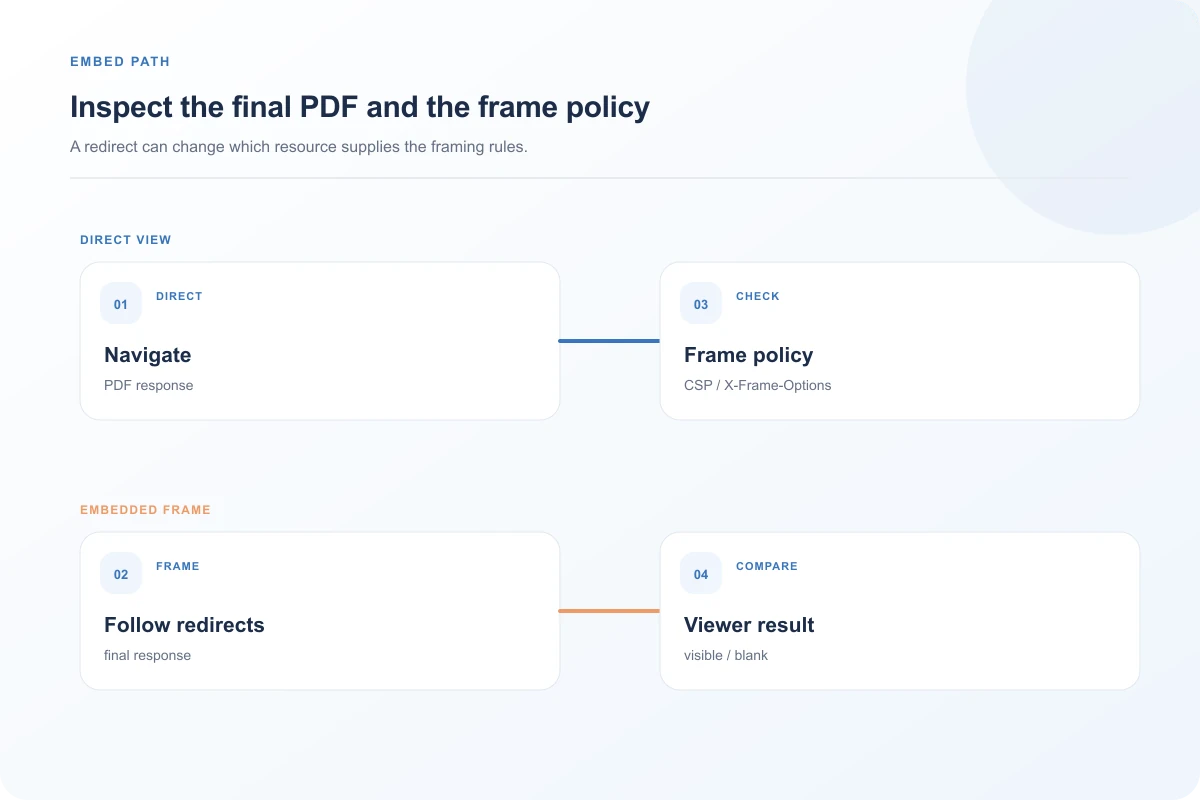
Inspect the final resource, including redirects
Select the iframe navigation in Network, then follow redirects to its final response. A short URL may lead to an authentication page, expired signed URL, or document viewer page rather than PDF bytes. Compare the direct-open request and iframe request: final URL, status, response type, content disposition, and cookies or authorization state. If the iframe ends at text/html with a login screen, the blank frame may be an authentication flow that cannot complete in an embedded context. Diagnose the actual response before editing layout.
The Content-Disposition header can request attachment, which tends to move the document into a download workflow rather than an inline viewer. That question is covered more fully in the separate download article. Here, it matters because it explains why an otherwise allowed iframe may not display a document. Likewise, a 403 or 404 response can render as a blank-looking panel when the frame has no useful error UI.
Avoid equating ordinary iframe navigation with a JavaScript PDF viewer. A native browser PDF viewer handles a PDF navigation through the browser. A viewer such as PDF.js may fetch the PDF from script; its cross-origin request and worker setup introduce separate requirements. If the page contains a script-driven viewer rather than a raw <iframe src="...pdf">, inspect its own error messages and the fetch request. Adding Access-Control-Allow-Origin to a raw PDF response does not remove a frame-ancestors or X-Frame-Options refusal.
Rule out a page layout problem
When the Network request succeeds and no policy refusal appears, inspect the iframe element in the rendered page. A frame with height: 0, an inherited display: none, or an overlay can make a successful load invisible. Give the frame a temporary visible border and explicit dimensions to see whether its box exists. An iframe load event alone is not proof that PDF rendering succeeded; error pages and blocked navigations can still leave confusing event sequences.
An iframe sandbox attribute can constrain navigation, scripts, and other capabilities. If your own markup supplies one, review the particular restrictions before loosening them. Do not blindly add every allow-* value. Browser PDF viewer availability and user preference can differ, so record browser name and version when a case persists after policy and layout checks. Mozilla's issue tracker contains a historical PDF iframe regression that was fixed; it is a reason to gather version details, not to assume current Firefox is broken.
What to change after you know the cause
For a parent frame-src refusal, update only the parent policy to include an authorized PDF source. For a child frame-ancestors or X-Frame-Options refusal, the PDF host must decide whether to permit the intended embedding origin. For a redirect to login, design an access flow that works in your chosen context or offer a direct authenticated opening. For a layout issue, repair the iframe box and responsive dimensions. Each fix belongs to a different layer, which is why the initial console message and final response are worth saving.
Keep a plain link beside the embed: “Open PDF in a new tab” gives a usable option for visitors with viewer limitations or devices where an embedded document is awkward. Where policy intentionally forbids embedding, respect that boundary and use the link as the permanent interface. A successful direct link and an unavailable iframe can coexist without the document itself being damaged.
Build a reproducible report for the document owner
When the PDF is hosted by another team, send them the exact embedding origin, the PDF's final host and path with private query values redacted, the browser version, and the console refusal text. Include the final PDF response headers relevant to framing and a direct-open result. This shows whether you need a parent policy update, a child policy change, or an access-flow discussion. “It is blank in our page” leaves the owner guessing whether the file ever reached the browser.
Compare the same document through a simple test page that has no application CSS and a visible iframe box. If it fails there with the same console error, layout is less likely. If it works there, compare the real page's Content Security Policy, sandbox attribute, and route. A minimal reproduction reduces variables while respecting the document's access rules. Do not publish the private PDF or its signed URL as a public reproduction.
Authentication deserves particular care. A top-level link may open in a signed-in browser session and receive a PDF, while an embedded request may reach a login route or be blocked by the host's session policy. The visible symptom could be blank because that login page itself refuses framing. Inspect the entire redirect chain rather than diagnosing only the final blank surface. If authorization must happen in a top-level context, an Open PDF link may be the correct permanent interaction.
Finally, test the fallback itself. It should have a descriptive label, reach the same intended document, and preserve access checks. Opening a PDF in a new tab should not accidentally expose a public file that the embed was protecting. The investigation is finished when the browser receives the intended document in the chosen context and the page still offers a usable path where inline viewing is unavailable.
If a script-driven viewer is involved, identify the viewer before applying iframe advice. PDF.js and similar libraries may fetch bytes with JavaScript, render pages to canvas, and use a worker. Their network and cross-origin constraints differ from a native PDF navigation. A frame-src fix for a raw iframe will not repair a viewer's failed fetch. Equally, adding CORS permission for a script fetch will not override a framed resource's X-Frame-Options. Keep those flows separate in the incident report.
The browser's rendering capability is the last branch, after response and policy checks. A document can be valid but use a feature a built-in viewer handles poorly, or a browser can be configured to open PDFs externally. Compare the same response in another current browser and a dedicated PDF reader, recording versions. That establishes a compatibility boundary without claiming the file host or embedding page is universally broken.
A sequence that avoids changing the wrong policy
Consider a page at portal.example that embeds files.example/report.pdf. Opening the PDF directly succeeds. On the page, the console reports a frame-ancestors refusal. The parent may also have a strict frame-src, but the explicit refusal points first to the PDF response. Capture the final PDF headers and ask the file host whether portal.example is an allowed ancestor. Adding files.example to the parent policy alone cannot override a child policy that disallows the parent.
Now consider the opposite console message: the parent page refuses to load files.example under frame-src. The PDF host may allow framing, yet the parent's policy blocks the navigation before the document is shown. The page owner can update its own policy for that source after considering whether the external host is trusted. There is no reason to ask the file host to strip X-Frame-Options when the browser already identified the parent restriction.
If neither policy message appears, inspect the response chain. A redirect from report.pdf to /login can make the iframe look empty if the login page itself cannot be framed. Open the final URL directly in the same authentication state and compare what it returns. A 200 status is compatible with an HTML login body. Where a top-level sign-in is required, let the user authenticate through a normal navigation and then open the document. Do not weaken frame security to compensate for an access flow that was never designed for an iframe.
Finally, try a known public test PDF on the same page and the same document in a minimal page. These controls isolate page layout from document policy. Keep the test files harmless and avoid copying private document URLs into public reproductions. The resulting matrix tells you whether a specific PDF, a specific parent page, or a browser/viewer context is responsible, which makes the fallback decision clear.
Sources and research
An original one-page PDF with X-Frame-Options: DENY produced a blank iframe on a localhost page in Chromium 156 on 3 November 2026. No specific policy console text was captured, and browser-specific PDF viewer compatibility was not surveyed.
- MDN: CSP frame-ancestorsThe resource being framed can limit which ancestor pages may embed it.
- MDN: CSP frame-srcThe parent page can limit iframe sources.
- MDN: X-Frame-OptionsDENY and SAMEORIGIN restrict framing on the delivered response.
- Mozilla bug 1941725A historical browser-specific PDF iframe issue was reported and later fixed; version matters.