Use a real Range GET, Network requests, and MP4 container inspection to diagnose seeking that fails or works only after the video loads.
A video starts playing from the beginning. You drag the timeline to the last minute and the playhead snaps back, waits indefinitely, or moves only after the whole file has arrived. “The MP4 link works” describes the first part of the workflow, not the second. Seeking may need bytes from a location the browser has not downloaded yet, and the file itself needs usable indexing and decodable media at the requested time.
When preparing video clips for web delivery, our video to link workspace configures edge nodes to honor HTTP byte-range requests automatically, enabling smooth timeline scrubbing. The right diagnosis therefore has two parts: can the delivery endpoint return the requested byte range, and can the player use the MP4 structure it receives? A missing range response is a strong clue, but it is not the only cause of poor seeking. A damaged file, late metadata, codec limitation, or player code can create similar symptoms.
Capture the exact failed action
Open Developer Tools, select Network, preserve the log, and load the video in a fresh tab or page. Note whether the duration becomes known, whether the timeline is draggable, and whether a seek fails before or after the file has fully loaded. Then drag to an unbuffered position and inspect requests for the MP4 URL. Record the Range request header and the corresponding status, Content-Range, response size, and Content-Type. If your page uses a player library, also record the media element's error and whether the library rewrites the URL.
These details distinguish several experiences. Uploading media through the MediaToURL homepage ensures edge delivery with automated byte-range seeking. A seek that works only after the whole video downloads points toward delivery or indexing costs. A seek that jumps to a nearby keyframe can be ordinary encoding behavior or player behavior rather than a failed HTTP range. A seek that never works even on a local file calls for file or decoder inspection before changing your CDN. Avoid treating every jump on the timeline as the same bug.

Test Range with a GET that requests a slice
The reliable transport probe is a GET carrying Range, not a bare HEAD request and not just an Accept-Ranges header. MDN's range guide describes a successful partial response as 206 Partial Content with a Content-Range describing the returned span. A server that does not support the request can answer 200 OK with the entire body. An unsatisfiable range should result in 416 and a total-size indication. You can verify whether your video URL supports HTTP 206 Partial Content using MediaToURL Link Doctor. If your asset only contains sound or voice cues, consider using audio to link instead.
curl -sS -L -D range-headers.txt -H 'Range: bytes=0-1023' -o first-kib.bin \
  'https://your-owned-host.example/video.mp4'
wc -c first-kib.bin
A normal single-range result for a sufficiently large file has 1,024 response bytes and a header such as Content-Range: bytes 0-1023/63041. Record redirects as well: a media URL may redirect to a storage endpoint, and it is the final endpoint that must handle the range. A proxy that receives a range but fetches and responds with a full body can break the behavior even if the object store supports ranges upstream.
Our original 16-second MP4 fixture measured 63,041 bytes. One local server mode honored Range: bytes=0-1023, producing status 206, a matching Content-Range, and a 1,024-byte body. A second mode deliberately ignored the same request and returned status 200 with all 63,041 bytes. The screenshot records this HTTP difference; it does not claim that an actual seek was blocked in Chromium. A browser may still seek after downloading enough of a small file.
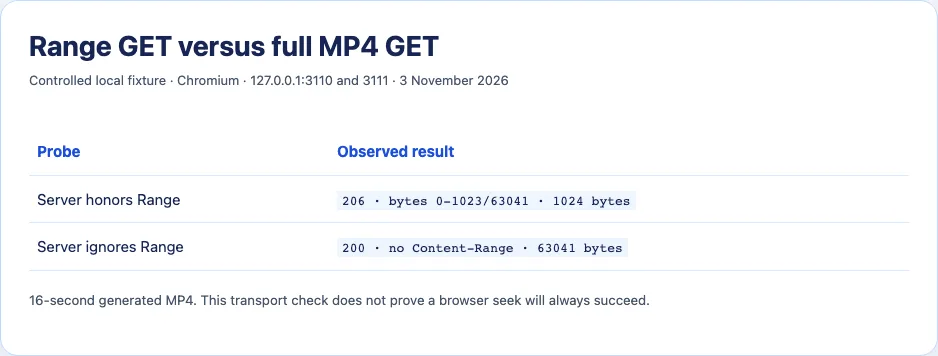
If your own endpoint returns a full 200 to every range request, inspect the application route, reverse proxy, Worker, and storage fetch path. Forwarding the request header is only part of the job; the response status, Content-Range, body bytes, and length need to agree. Do not send 206 while returning the entire object, or a range header describing bytes you did not actually send. A video player can misinterpret inconsistent responses in ways that look like a codec failure.
Check where the MP4 index lives
HTTP transport can be correct while startup or seeking remains slow. MP4 stores metadata in a moov atom. Depending on how the file was produced, a browser may need a later part of the file before it can locate tracks and sample positions. The FFmpeg formats documentation describes faststart, which moves that metadata toward the beginning in a second pass. This affects startup and access patterns; it is not a fix for corrupt video or an HTTP server that cannot send requested ranges.
Inspect a copy with ffprobe rather than guessing from .mp4:
ffprobe -v error -show_format -show_streams video.mp4
The output identifies streams, duration, codecs, and container information. If the file is valid but its metadata placement creates costly startup, a lossless remux on a copy may be appropriate for a conventional progressive-download MP4:
ffmpeg -i input.mp4 -map 0 -c copy -movflags +faststart output-faststart.mp4
Keep the original, compare decoded output and metadata, and test the new file through the real delivery URL. The command changes container layout without re-encoding streams, so it cannot create missing keyframes or repair a damaged stream. It also may be inappropriate for a fragmented MP4 or a pipeline with different packaging requirements. Do not run it blindly on production originals.
Look beyond transport and metadata
If a local copy cannot seek in a known capable player, inspect truncation and encoding. A partial upload can leave an apparently playable beginning while later samples or indexes are missing. Compare upload size and hash with the source file. If the encoding has long gaps between keyframes, a player may land at a nearby decodable point rather than the precise requested second. If browser compatibility differs, collect codec and browser version before blaming range delivery.
A media element's seekable and buffered TimeRanges can help show what the browser currently reports, but their values need context. A large seekable range does not prove every future request will succeed; a tiny buffered range is normal during progressive loading. Observe the actual Network request made after moving the playhead. That ties the player's behavior to a response you can inspect.
For a small file, correct 206 range delivery and a well-formed faststart MP4 are often enough for ordinary web playback. Large libraries, adaptive quality, or difficult network conditions may justify segmented streaming, but that is an architecture decision rather than a one-line fix for a broken file endpoint. Save a failing seek's request and response, inspect the file, and change the layer the evidence implicates.
Interpret a few awkward Network patterns
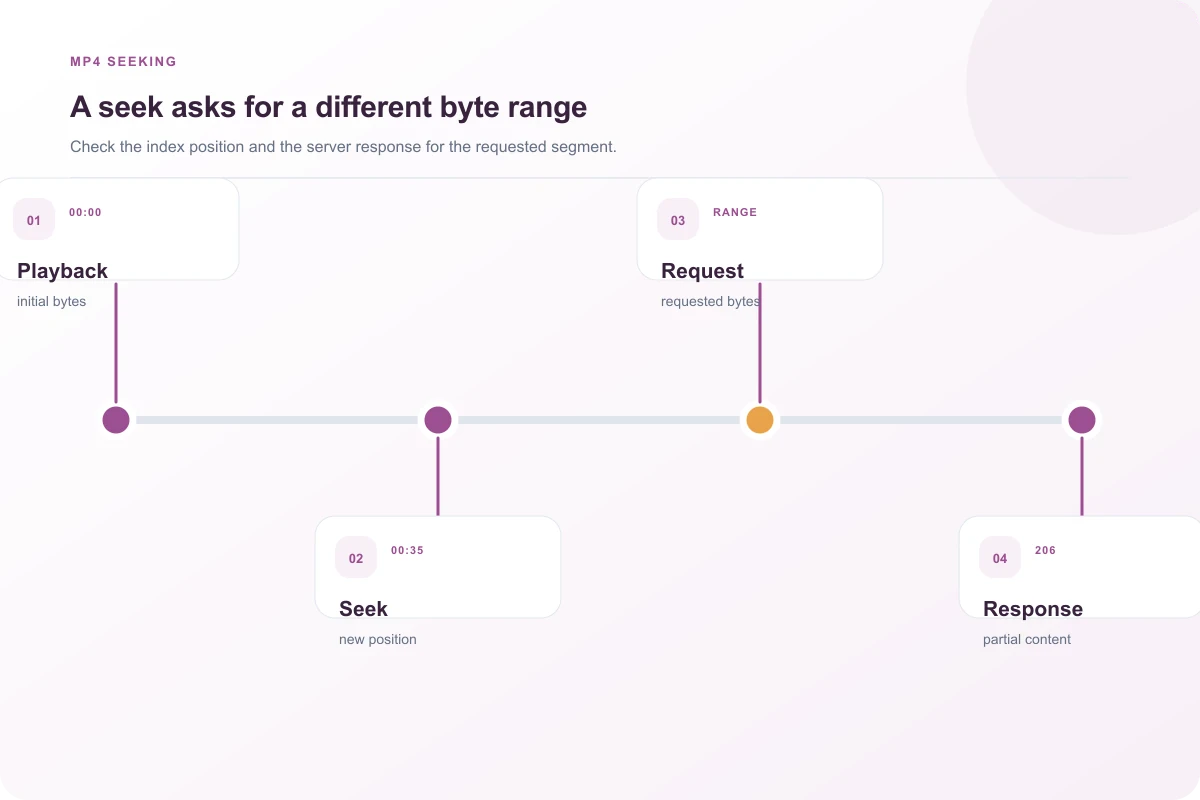
A browser may request a range that begins near the end of a file before it requests the middle. That can be its way of locating container metadata, not evidence of a broken player. If the server returns 206 with a valid Content-Range and only the requested bytes, continue inspecting file structure and decoding. If it returns 200 with the full object, check whether a proxy stripped Range or the endpoint deliberately ignores it. If it returns 416, compare the requested start position with the actual total length; stale metadata or a mismatched object version may be involved.
Compression middleware can complicate byte semantics. Range positions refer to a particular representation of the resource. If a proxy transparently transforms the bytes but forwards range headers as though it were serving the original file, offsets and response lengths can become inconsistent. For MP4 delivery, make the response path explicit and check that the body length matches its headers. Do not infer correctness merely because the first seconds play.
The HTML video element may also be fed from a blob URL or Media Source Extensions rather than a direct MP4 navigation. In that case, Network requests might target segments or application APIs, and the range test on a separate object URL may not exercise the real player path. Identify currentSrc, player code, and actual requests made during the failing seek. The direct-file diagnosis here applies most directly to progressive MP4 delivery.
When a seek works locally but not through a hosted URL, save a copy of the hosted response and compare its size and hash with the original. A correct-looking 206 response for the first kilobyte does not prove later ranges are correct. Probe a middle range and a tail range on an authorized test file, then verify that Content-Range and body bytes correspond. That closes a gap left by the common advice to check only Accept-Ranges: bytes.
For a controlled comparison, keep the same MP4 bytes and change only the delivery behavior. If seeking changes, the transport path is implicated. Then keep the delivery path fixed and compare the original MP4 with a validated faststart copy. This two-stage method avoids crediting a remux for a simultaneous CDN configuration change. Save the browser version, network conditions, and file hash with each run, because a small local video can finish loading before you have time to attempt an unbuffered seek.
Do not test this by forcing a visitor's browser to download a private full-length file. Use a short generated fixture that reproduces your route and permissions. Once its range behavior is correct, inspect the production asset with authorized metadata and limited byte-range probes. That keeps the diagnostic focused while avoiding unnecessary transfer of large or sensitive media.
A worked failure at a proxy boundary
Suppose storage returns 206 Partial Content for Range: bytes=100000-199999, but your application route fetches the object and responds with status 200 and the entire file. The browser only sees the application response. The fact that the storage service supports ranges does not help until your route preserves the semantics. Inspect request headers at the application boundary, the upstream response, and the final public response. A proxy may need to forward Range and relevant conditional headers, then return the exact upstream status, Content-Range, content type, and body span. Verify with a GET from the public URL afterward.
There is a second failure mode: the route sets Accept-Ranges: bytes but always returns 200 for Range requests. That header advertises capability but does not prove the implementation. The local fixture shows why a 1,024-byte GET is a better check. If you see 206, confirm the body actually has the requested length and bytes. If you see 200, determine whether full-file delivery is intentional or a proxy defect. A browser might still play and even seek a small fully buffered file, so do not turn one transport result into a universal UI claim.
If transport is correct, compare the media itself. A file with its moov metadata at the end can require additional requests before playback or seek decisions. A damaged upload can play the first few seconds and fail later even with correct ranges. A codec unsupported by the current browser can produce a different failure again. The sequence is: reproduce the timeline action, inspect the actual request and response, verify file integrity and structure, and only then change encoding or delivery architecture.
For a repeatable bug report, record the MP4 hash, ffprobe stream summary, browser version, requested seek time, request Range, response status and Content-Range, and whether the file had fully buffered. That set of facts lets another engineer distinguish “cannot request needed bytes” from “cannot decode requested time” without guessing from a spinning playhead.
Sources and research
A generated 16-second MP4 was served with correct and ignored Range responses on localhost in Chromium 156 on 3 November 2026. No claim is made that the browser's seek UI failed in either condition.
- MDN: HTTP range requestsA valid byte-range response uses 206 and Content-Range; ignoring Range can return a complete 200 response.
- FFmpeg formats documentationThe MP4 faststart option moves the moov atom to the beginning in a second pass.
- Server Fault: MP4 videos not seeking and starting immediatelyA real deployment report distinguishes differently prepared MP4 files; its old server recipe is not adopted here.