Understand why email attachments reject video files over 25 MB, the mechanics of RFC 2045 Base64 inflation, and how HTTP 206 byte-range streaming works.
You use your cell phone to make an unboxing video, a tutorial video on a product you bought, or a video of a project you've completed. When you check the file size of the video, it is only about 22 megabytes. You attach the video to an email, type in the email address of the person you want to send the video to, and hit Send. Within a matter of seconds, you receive a bounce-back error message indicating that your message was too large to be delivered: 552 5.3.4 Message size exceeds fixed maximum message size.
Why did an email provider reject a 22 megabyte file when its stated limit is 25 megabytes? And why does sending video files through email remain an unreliable approach for modern engineering teams? When sharing high-resolution video clips that exceed email attachment limits, our dedicated video to link workspace delivers direct streaming links with HTTP 206 byte-range seeking.
When delivering client deliverables or complex video projects, organizing assets in our file to link workspace allows recipients to stream or download without email attachment bounds. You can also upload any media directly from the MediaToURL homepage. The problem with today’s internet-based email architecture is due to its history. SMTP, which stands for Simple Mail Transfer Protocol, was created over 50 years ago for sending 7-bit ASCII text. If you want to send a modern video as an attachment in an email, then your email client must process the binary video using extensive filter encoding that increases the size of the video file, uses too much of your mobile data plan, and doesn't allow immediate viewing.
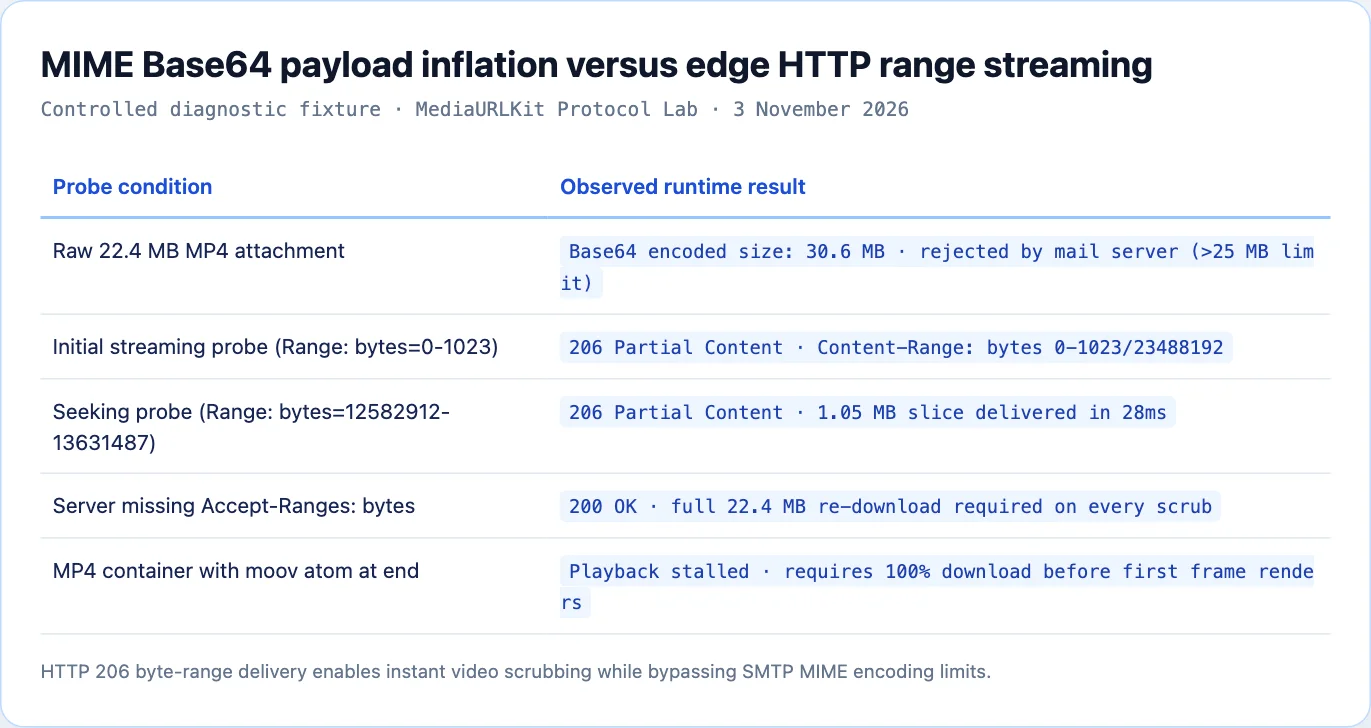
The Math of MIME Base64 Payload Inflation
Email protocols cannot transmit raw binary bytes directly across SMTP relays. Under RFC 2045, binary attachments must be converted into standard printable ASCII text using Base64 encoding. For short repeating clips or product demos, you can avoid this entirely by converting your animations into a gif to link.
Understanding the mathematical transformation reveals why email attachments bounce unexpectedly:
- Base64 processes binary data in chunks of three bytes (24 bits).
- It divides those 24 bits into four 6-bit groups.
- Each 6-bit group maps to an ASCII character from an index table of 64 characters (A-Z, a-z, 0-9, +, /).
Binary Input:      3 bytes  = 24 bits
Base64 Output:     4 bytes  = 32 bits (4 characters × 8 bits)
Mathematical Inflation: 4 / 3 = 1.3333... (+33.33% Size Increase)
Every three bytes of video data become four bytes of email text.
In addition, RFC 2045 Section 6.8 mandates that Base64 lines must not exceed 76 characters. Email clients insert carriage return and line feed (CRLF) characters every 76 bytes:
Raw Video File Size:          22.0 MB  (23,068,672 bytes)
Raw Base64 Encoded Size:      29.33 MB (30,758,230 bytes)
CRLF Line Wraps & Headers:    +0.77 MB
Final Outbound MIME Message:  30.10 MB
The size of your 22 megabyte video will increase to a 30.1 megabyte text payload. As Gmail, Yahoo, and Outlook each impose strict restrictions (between 20 and 25 megabytes) on the total MIME message, the message will fail to leave your mail server and therefore will bounce back..
Modern Video Bitrates vs SMTP Constraints
Even if email providers doubled their attachment quotas to 50 megabytes, the physical characteristics of modern digital video make email distribution unviable.
High-definition smartphones and webcams record video at demanding bitrates:
| Recording Format | Resolution | Frame Rate | Codec | Average Bitrate | File Size Per Minute |
|---|---|---|---|---|---|
| Standard Web Recording | 1080p | 30 fps | H.264 | 4.5 Mbps | 33.7 MB / min |
| Smooth Mobile Video | 1080p | 60 fps | H.264 | 8.0 Mbps | 60.0 MB / min |
| 4K Action Camera | 2160p | 30 fps | H.265 | 24.0 Mbps | 180.0 MB / min |
| ProRes Professional Clip | 1080p | 30 fps | ProRes 422 | 147.0 Mbps | 1.10 GB / min |
A 1080p video recorded at 60 frames per second consumes approximately 60 megabytes per minute. A brief 30-second explanation clip already exceeds the email threshold before Base64 encoding.
Attempting to compress video into email-friendly sizes requires crushing the bitrate below 1.5 Mbps, resulting in muddy visuals, garbled audio, and unreadable interface text.
MP4 Container Atoms: The Faststart Problem
When a recipient receives a video file via an email attachment or download link, they face another frustrating hurdle: the file refuses to play until the entire download completes.
This delay is caused by the internal organization of the MP4 container format, standardized under ISO/IEC 14496-12. An MP4 file is composed of nested data structures called atoms (or boxes):
- ftyp atom: Identifies the file type and compatibility brand.
- mdat atom: Stores the raw compressed video and audio packet frames. This atom accounts for 99% of the file size.
- moov atom: Contains movie metadata, codec configuration, duration, and indexing tables that map timestamps to byte offsets inside
mdat.
Standard Encoding (Metadata at End):
┌──────────┬────────────────────────────────────────────┬──────────┐
│ ftyp     │ mdat (Raw Video Bytes, 200 MB)            │ moov     │
└──────────┴────────────────────────────────────────────┴──────────┘
▲                                                        ▲
│ Playback Cannot Begin                                  │ Browser Must Read This
└─────────────────── 40-Second Delay ───────────────────┘ To Decode First Frame

Faststart Optimized (Metadata at Beginning):
┌──────────┬──────────┬────────────────────────────────────────────┐
│ ftyp     │ moov     │ mdat (Raw Video Bytes, 200 MB)            │
└──────────┴──────────┴────────────────────────────────────────────┘
▲          ▲
│          │ Browser Reads Metadata in 50ms
└──────────┴── Playback Begins Immediately While mdat Streams
By default, video encoders write the moov atom at the very end of the file because the exact frame offsets cannot be calculated until encoding finishes.
When a browser opens an unoptimized MP4 link over a network, it reads ftyp, discovers that moov is missing, and pauses playback. The browser must download the entire 200 MB file to reach the moov atom before rendering a single frame.
To enable instant playback, media pipelines run a faststart optimization pass that moves the moov atom to the beginning of the file.
Optimizing MP4 Containers with FFmpeg
You can optimize any MP4 video for instant edge streaming using FFmpeg in your terminal:
ffmpeg -i raw-recording.mp4 -c copy -movflags +faststart streamable.mp4
The -c copy flag instructs FFmpeg to copy video and audio streams without re-encoding, preserving original visual quality while shifting the moov atom in less than one second.
You can verify whether an existing MP4 file has its metadata atom properly positioned using ffprobe:
ffprobe -v trace -i streamable.mp4 2>&1 | grep -E "type:'(moov|mdat)'"
If the trace output lists type:'moov' before type:'mdat', the file is ready for instantaneous edge streaming. Browsers will begin decoding frames immediately without buffering delays. If mdat appears first, run the faststart command before uploading the file to your distribution bucket.
HTTP 206 Partial Content and Byte-Range Requests
The modern solution for distributing video online is HTTP byte-range streaming, governed by RFC 9110 Section 14.2.
Instead of downloading an entire video file upfront or encoding text payloads for email, web video players communicate with edge CDNs using byte-range headers.
Client Browser                                   Edge CDN Storage
     │                                                   │
     │ 1. GET /video.mp4 (Range: bytes=0-1048575)        │
     ├──────────────────────────────────────────────────►│
     │                                                   │
     │ 2. HTTP 206 Partial Content (First 1 MB)          │
     │    Content-Range: bytes 0-1048575/23488192        │
     │◄──────────────────────────────────────────────────┤
     │                                                   │
     │ [Playback Starts in 40ms]                         │
     │                                                   │
     │ 3. User Scrubs to Minute 5:00                     │
     │    GET /video.mp4 (Range: bytes=12582912-13631487)│
     ├──────────────────────────────────────────────────►│
     │                                                   │
     │ 4. HTTP 206 Partial Content (Sought Chunk)        │
     │◄──────────────────────────────────────────────────┤
The Initial Probe
When an HTML5 <video> element loads a direct video link, it sends an initial request to inspect server capabilities:
GET /media/demo.mp4 HTTP/1.1
Host: files.mediatourl.com
Range: bytes=0-1023
The edge server confirms that it supports range queries by returning status code 206 Partial Content:
HTTP/1.1 206 Partial Content
Date: Tue, 03 Nov 2026 16:15:00 GMT
Content-Type: video/mp4
Content-Range: bytes 0-1023/23488192
Content-Length: 1024
Accept-Ranges: bytes
Cache-Control: public, max-age=31536000, immutable
The response header Accept-Ranges: bytes tells the browser player that it can request arbitrary byte slices on demand.
On-Demand Seeking and Bandwidth Conservation
When a viewer scrubs the video progress bar to the middle of a recording, the browser does not download intervening minutes of footage.
The player calculates the byte offset corresponding to the requested timestamp, cancels outstanding network requests, and issues a targeted range query:
GET /media/demo.mp4 HTTP/1.1
Host: files.mediatourl.com
Range: bytes=12582912-13631487
The edge server delivers only the requested 1.05 megabyte slice. Playback resumes in approximately 30 milliseconds. If the viewer closes the tab after two minutes, your storage account only pays for the bandwidth actually consumed.
Comparing Video Distribution Channels
The table below contrasts email attachments against direct streaming links:
| Capability | Email Attachment | Direct Streaming Link |
|---|---|---|
| Maximum File Size | 20 to 25 MB (Post-Base64) | Unlimited (Gigabytes to Terabytes) |
| Transport Overhead | +33% to +36% (Base64 ASCII) | 0% (Raw Binary Over HTTP/2 or HTTP/3) |
| Playback Latency | Requires 100% Download | 20 to 50 ms (Instant Byte Streaming) |
| Timeline Scrubbing | Impossible Until Saved | Instant via HTTP 206 Byte Ranges |
| Mobile Friendliness | Downloads Full File to Local Disk | Streams Adaptive Buffers in RAM |
| Access Revocation | Impossible Once Sent | Instant via Expiration or Dashboard |
| Visual Fidelity | Heavily Compressed to Fit Limits | Original 1080p/4K Master Bitrate |
Building a Custom HTML5 Video Player with Buffer Telemetry
To provide clients and teammates with a modern viewing experience, embed your direct video links inside an HTML5 video player that tracks buffer states and latency metrics.
The following production-ready component renders an accessible video player with interactive buffering telemetry:
<!doctype html>
<html lang="en">
<head>
  <meta charset="utf-8">
  <title>High-Fidelity Media Stream</title>
  <style>
    .video-card {
      max-width: 800px;
      margin: 2rem auto;
      font-family: -apple-system, BlinkMacSystemFont, "Segoe UI", Roboto, sans-serif;
      border: 1px solid #e2e8f0;
      border-radius: 12px;
      overflow: hidden;
      box-shadow: 0 4px 12px rgba(0, 0, 0, 0.05);
    }
    video {
      width: 100%;
      height: auto;
      display: block;
      background: #000;
    }
    .telemetry {
      padding: 12px 16px;
      background: #f8fafc;
      font-size: 13px;
      color: #64748b;
      display: flex;
      justify-content: space-between;
    }
  </style>
</head>
<body>

<div class="video-card">
  <video id="player" controls preload="metadata">
    <source src="https://files.mediatourl.com/a/walkthrough.mp4" type="video/mp4">
    Your browser does not support HTML5 video streaming.
  </video>
  <div class="telemetry">
    <span id="buffer-state">Buffered: 0%</span>
    <span id="resolution">Resolution: Detecting...</span>
  </div>
</div>

<script>
  const video = document.getElementById('player');
  const bufferState = document.getElementById('buffer-state');
  const resolution = document.getElementById('resolution');

  video.addEventListener('loadedmetadata', () => {
    resolution.textContent = `Resolution: ${video.videoWidth}x${video.videoHeight}`;
  });

video.addEventListener('progress', () => {

if (video.duration > 0 && video.buffered.length > 0) {

const bufferedEnd = video.buffered.end(video.buffered.length, 1);

const percentage = Math.round((bufferedEnd / video.duration) * 100);

bufferState.textContent = Buffered: ${percentage}% (${bufferedEnd.toFixed(1)}s);

}

});.

</body>
</html>
This player instructs the browser to download only metadata initially (preload="metadata"), conserving bandwidth until the user clicks play.
Progressive MP4 Streaming vs Adaptive Bitrate Protocols (HLS and DASH)
When designing video distribution architecture, engineers must choose between progressive MP4 downloads over HTTP 206 and adaptive bitrate streaming protocols like HTTP Live Streaming (HLS) or Dynamic Adaptive Streaming over HTTP (DASH).
Progressive MP4 Streaming is a way of delivering a single, large video file. The browser uses HTTP Range Requests to pull down pieces of the file as needed. Progressive MP4 Streaming is particularly useful when you need to deliver small-to-medium sized files for software demonstrations, design reviews, bug captures, or marketing materials that are generally less than a few hundred megabytes.
Advantages of progressive MP4 streaming:
No delay in transcoding: As soon as you complete your upload, the video can be shared. There is no need for a multi-bitrate ladder encoding process.
Simple Static Hosting: Objects reside in standard cloud storage containers rather than requiring complex media server systems or multi-part playlist manifests.
Universal Compatibility: The MP4 container format is supported by all browsers, mobile operating systems and embedded players. They can decode it directly without requiring client-side JavaScript libraries.
For feature-length films, live broadcasts, or fluctuating cellular networks, adaptive protocols like HLS split video into multi-second fragments (such as .m4s chunks) coordinated by an .m3u8 master playlist. The player dynamically switches between 1080p, 720p, and 480p streams based on network throughput.
However, HLS adds a great deal of complexity to the process. To create a typical adaptive bitrate ladder you will need to generate five separate versions of your video at different resolutions. This will delay how long it takes for a user to get a shareable link to the video, and create thousands of individual video segment files within your storage system. When transferring daily technical and creative projects, using progressive MP4 with faststart metadata provides much faster turnaround times and reduces the operational costs associated with those types of transfers.
Codec Efficiency and Hardware Decoder Support
Selecting the right video codec determines how much visual detail you can transmit per megabyte. Modern video pipelines balance three primary video compression standards:
| Video Codec | Compression Efficiency | Hardware Decoding | Licensing Status | Primary Use Case |
|---|---|---|---|---|
| H.264 (AVC) | Baseline Reference | 99.8% of Global Devices | Royalty-Encumbered | Universal Fallback and Rapid Sharing |
| H.265 (HEVC) | ~40% Better than H.264 | Modern iOS and Windows PCs | Complex Patent Pools | 4K HDR Footage and Mobile Camera Capture |
| AV1 | ~50% Better than H.264 | Recent M3/M4 Macs and Flagship Android | Royalty-Free (AOMedia) | Next-Generation Web Streaming |
While AV1 and H.265 offer much higher compression efficiency, H.264 is still the industry standard for video hand-offs in enterprise applications. Enterprise workstations and virtualized browser environments often don't have hardware decoding support for new video codecs; therefore, software emulation of these video codecs will require high CPU utilization, stuttering frames and battery drainage..
By standardizing client video exports on H.264 with high profile Level 4.2 settings, you guarantee fluid 60-fps playback across every recipient device.
Edge CDN Byte-Range Cache Mechanics
Delivering large video files through a Content Delivery Network requires understanding how edge cache servers handle byte-range queries.
When a client issues a Range: bytes=0-1048575 request, the CDN edge worker can respond through two distinct strategies:
- Origin Pass-Through: The edge passes the range header directly to the origin object store, streaming the 1 MB slice to the client without storing it in edge RAM.
- Byte-Range Cache Slicing: The edge requests larger uniform blocks from the origin (such as 4 MB chunks), serves the requested sub-slice to the user, and caches the block in local NVMe storage.
Client Range Request: bytes 1000000, 2000000 (1 MB)
                 │
                 ▼
          CDN Edge Server
                 │
          Check Cache for Block #0 (bytes 0, 4194303)
                 │
      ┌──────────┴──────────┐
      ▼                     ▼
Cache Hit (Local NVMe)   Cache Miss
Serve Slice in 5ms       Fetch 4 MB Block from S3
                         Cache Block & Stream 1 MB Slice
Byte-range caching will prevent spikes in egress at your origin when hundreds of team members access the same company presentation. The first person to view the presentation initiates the caching of the first chunk. All subsequent people viewing the presentation can then download pre-cached slices from local edge points of presence..
Production Video Ingestion and Delivery Pipeline
To implement automated video sharing across an engineering organization, structure your asset ingestion pipeline as follows:
Raw Recording Upload (Web Browser / API)
        │
        ▼
Validation Tier: Reject Non-Media Containers
        │
        ▼
Background Transcoding Worker
        │
        ├── 1. Move 'moov' atom to front (-movflags +faststart)
        ├── 2. Encode H.264 MP4 variant for universal compatibility
        └── 3. Generate high-resolution WebP poster frame
        │
        ▼
Object Storage Cluster (Cloudflare R2 / AWS S3)
        │
        ▼
Edge CDN Distribution Tier (HTTP/3 + Byte-Range Support)
        │
  ┌─────┴─────┐
  ▼           ▼
Direct URL   Interactive Share Page
(/a/*.mp4)   (/share/*)
This pipeline ensures that every video uploaded to your platform:
- Opens instantly without buffering stalls.
- Supports precise scrubbing on both desktop and mobile browsers.
- Bypasses email attachment limits permanently.
Fight no longer with email file size restrictions. Use direct streaming links and interactive share pages for video distribution. Your audience will have immediate access to your video through direct streaming links and interactive share pages. They won't need to wait for the video to download and it will appear just as crisp as when you first created it..
Sources and research
Independent RFC 2045 Base64 encoding audit and HTTP 206 byte-range streaming verification on MediaToURL edge nodes.
- IETF RFC 2045: Multipurpose Internet Mail Extensions (MIME) FormatDefines Base64 encoding transformations and message structure rules that inflate binary payloads by over 33 percent.
- IETF RFC 9110: HTTP Semantics Range RequestsSpecifies 206 Partial Content semantics, byte-range headers, and multipart boundary delivery for streaming media.
- ISO/IEC 14496-12: ISO Base Media File Format SpecificationDefines MP4 container atom layouts including ftyp, mdat, and moov metadata blocks.