Follow a signed file URL from generation through cached markup and a later GET, then choose renewal or stable delivery according to access needs.
An embedded file works when you publish the page. A day later a visitor sees a broken image or receives 403 from the document link, although the page itself still loads. Replace temporary expiring cloud storage tokens with permanent CDN addresses using our file to link room. The URL may have been a temporary delivery credential, copied into HTML that outlived it. Embedding does not normally consume a one-use token; time, signing credentials, permissions, and exact request details determine whether a later GET is accepted.
This matters because a signed URL looks like an ordinary link. Its query string is part of the authorization. Cloudflare's R2 presigned URL guide describes R2's S3 API signing model, while Amazon S3's guide describes AWS-specific validity and credential behavior. They are related systems, but their domain and token details should not be treated as interchangeable.
Follow one request through time
Record when the URL was generated, what expiry was requested, which operation it signs, and when the failing browser request happened. Do not publish the full URL in screenshots, analytics, chat, or an issue tracker. Anyone holding a valid bearer URL may be able to access the file until it stops being valid. Capture a redacted URL shape, response status, provider error code, and server time instead.
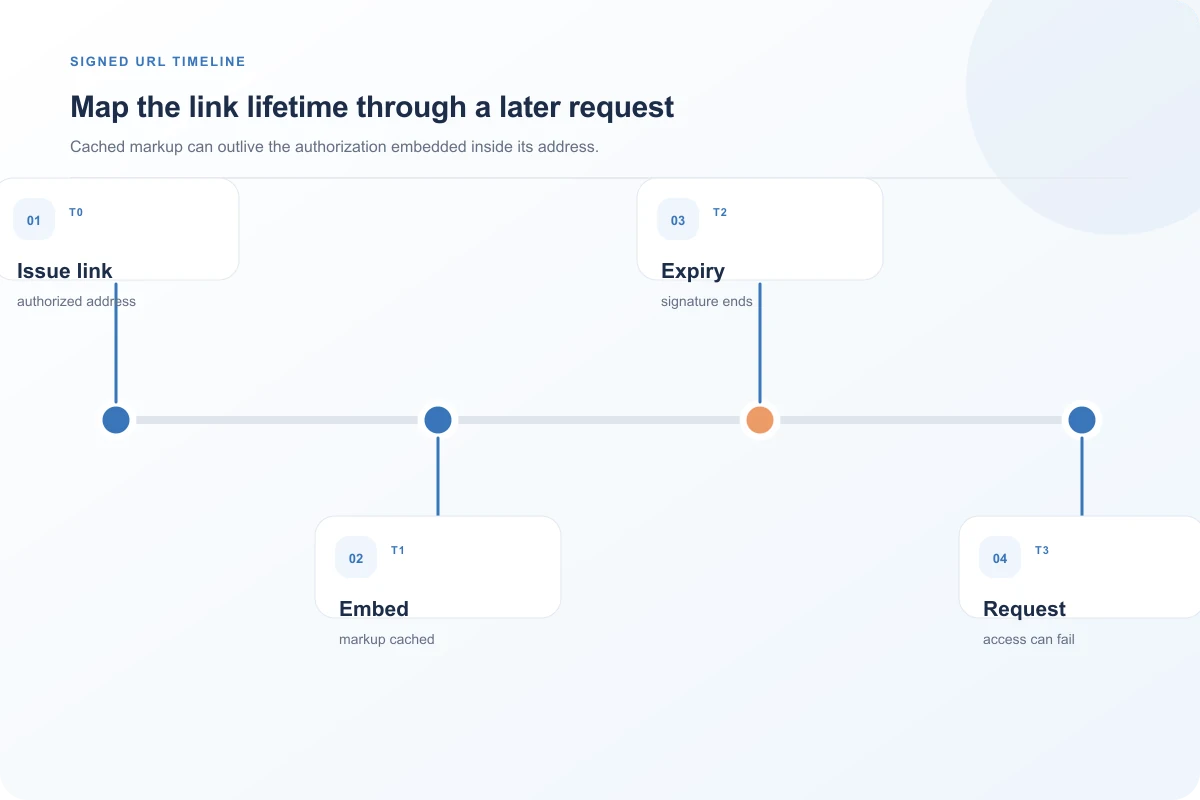
The page may have several different lifetimes. The HTML can be cached for hours. The image body might be held in a browser cache. The signature may expire in minutes. A visitor who loaded the image earlier can still see pixels already in their tab, while a later visitor's fresh request fails. The visible old tab is not proof that the signed URL remains valid for new requests. Conversely, a page cache can continue to deliver expired query strings even after the application has code that generates fresh ones.
Our controlled loopback example signed a harmless image path with a local HMAC and an expiry less than a second away. Chromium 156 received status 200 for a fresh GET before the time and 403 for a fresh GET afterward. The screenshot hides the token and explicitly identifies the local simulation. It demonstrates timing and request freshness only; it is not a test of an R2 or S3 account.
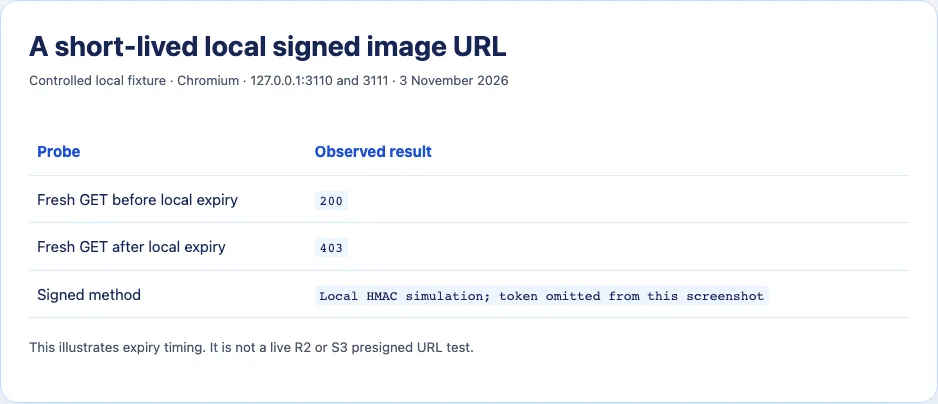
The result explains why a hard-coded signed URL is unsuitable as a durable public image address. It does not mean every 403 is an expiry. A query string altered by an HTML editor, a signed GET used as HEAD, a different host, changed permissions, revoked credentials, or an object that no longer exists can also fail. Inspect the provider's actual error response rather than inferring the cause from the status alone.
Signature lifetime is not always the number you requested
For S3, AWS documents that a presigned URL expires at its configured time or when its associated credentials expire, whichever comes first. Temporary credentials can therefore shorten a URL that was created with a longer requested duration. Revoking, deleting, or deactivating the signing credentials can end validity as well. AWS checks the expiration at request time; a download started just before expiry may continue, while a new request after expiry fails. Do not assume those AWS-specific details describe R2 token lifetime identically.
R2 has its own constraints. Its documentation says presigned URLs use the S3 API domain rather than an arbitrary custom domain, and the signed parameters are not freely editable. If your application rewrites the host, strips query parameters, changes encoding, or turns a signed operation into a different method, the signature may no longer match. A CDN or redirect in front of a signed route needs deliberate design. Test the exact URL and HTTP method that the browser uses.
When diagnosing, avoid curl -I as the only check. HEAD may not be the operation that was signed. Use a fresh GET against a safe small file, redact the credential in saved logs, and compare it with the browser's failing request. For a large file, do not indiscriminately fetch private content merely to test status; use an authorized fixture or an application-side diagnostic that preserves confidentiality.
Choose a stable address only when access is meant to be public
If the asset is truly public and is meant to appear in public HTML indefinitely, a stable public delivery URL may be the simplest model. That choice changes security: anyone who learns the public URL can retrieve the file without the former authorization check. Do not make a private invoice, account upload, or restricted media object public just to stop a broken embed. Review the file's intended audience and retention before switching access models.
For private content, keep the page's durable identifier separate from its temporary delivery URL. When an authorized viewer opens the page, the application can check access and issue a fresh signed GET URL with a lifetime suitable for that view. A viewer open for a long time may need to renew before retrying a failed fetch. Alternatively, an authenticated application endpoint can serve bytes after checking the current session. That route must preserve appropriate caching, range, and content headers for the file type; it is not a free proxy shortcut.
Publicly cached HTML should not contain a private short-lived URL generated for one user. The cached page could share a bearer capability with unintended visitors and continue serving it after expiry. If a page is private, set its cache policy accordingly and generate the delivery capability after authorization. A redirect endpoint can be useful if it authorizes each request before issuing a fresh target, but its own caching policy must not preserve an old Location header beyond the signature's useful life.

Confirm the repair with a later fresh request
After changing the access design, test as a new visitor after the original signature would have expired. Check the browser Network panel for the selected file URL, request time, final status, and whether an old page or service worker supplied stale markup. Repeat using a fresh browser context so a cached image body cannot make a failed remote request look successful. When the file should remain private, verify that an unauthorized viewer still cannot obtain a fresh delivery URL.
An expired signed URL is doing its job when it denies a later request. The application problem is treating that temporary capability as a permanent address. Keep the permanent page reference and access decision stable, and renew the actual delivery URL only for viewers who remain entitled to the file.
Build an expiry timeline for a real incident
Write down four times: page generation, URL signing, first successful request, and later failed request. Include the time zone and clock source. Compare the configured URL lifetime with the actual signing credential lifetime when your provider uses temporary credentials. A page published at 09:00 with a one-hour signed URL can be cached until the next day; the later visitor receives valid HTML containing an invalid capability. Refreshing the page will not help if the cached HTML still contains the same expired query string.
Check whether the page generated a new URL at all. A server-rendered private page might create one for each authorized request. A static build might bake one string into the output. A client-side application might keep an old URL in state for hours after the user opens the tab. Those are distinct renewal points. Network records can show whether the later attempt used the old query string or obtained a new one. Do not place the full query in long-lived logs; a redacted hash or token identifier can help correlate attempts without preserving access-bearing material.
If a fresh URL also fails, inspect the provider's error details. An expiry error, signature mismatch, missing object, access-denied policy, and wrong signed method need different remedies. The URL's visible expiry timestamp can be informative but is not conclusive when credentials have a shorter life or permissions change. Clock skew may also matter in signed request systems; record server time rather than assuming the visitor's wall clock is the authority.
Protect URLs in operational tooling. A presigned link in public HTML can be copied by anyone allowed to view that page; a link in an analytics event, referrer, or shared screenshot may reach more people than intended. Decide whether the file is public or private before choosing the cache policy and delivery route. If it is private, test with an authorized account and a separate unauthorized account after renewal. Successful viewing alone does not establish that access control remained correct.
There is no need to make signatures last forever to solve a durable embed. Use a stable application identifier in the page and issue short-lived delivery capability when needed. If a document must be accessible to the public for years, publish it through an intentional public route with a stable URL and appropriate cache headers. If access can change, keep authorization in the request path. The right lifetime is a consequence of the access model, not a magic number to paste into a signer.
A worked page-cache failure
Imagine a private report page generated at 09:00 with a signed image URL that expires at 09:15. The page response is cached for one hour. A visitor who opens it at 09:05 fetches the image successfully. Another visitor opens the cached page at 09:30 and receives the same HTML, including the now-expired image URL. The image request fails. The first visitor might still see the image because it is already decoded or cached locally, making the problem appear inconsistent. The real mismatch is between page cache lifetime and capability lifetime.
The repair depends on access. If the page is private, ensure the page is served only after current authorization and do not share its signed URL through a public cache. Generate a fresh capability for each authorized view or use an authenticated media endpoint. If a long-open tab must refresh the media, renew the capability before retrying. A fixed “add one hour” extension may delay the incident without fixing it, and it increases the period during which a copied bearer URL can be used.
If the file is intended for everyone, decide whether a public URL is acceptable. That is a security decision: the previous signature enforced a time and operation boundary, while a stable public path generally allows anyone with the URL to fetch the file. Do not change that access model solely because one embedded image broke. Separate public marketing images from private account files so each gets a delivery policy suited to its audience.
After implementing renewal, test at least one request beyond the old expiry time from a fresh browser context. Confirm that the page receives a new delivery URL and that an unauthorized context cannot obtain one. Also verify the redirection or page cache does not keep an old Location or HTML fragment. This proves the access-aware flow over time, which a successful request immediately after signing cannot establish.
Sources and research
A harmless local HMAC image endpoint returned 200 before and 403 after its short expiry in Chromium 156 on 3 November 2026. No live R2 or S3 presigned URL was generated or tested.
- Cloudflare R2: Presigned URLsR2 presigned URLs are signed bearer capabilities for S3 API operations and have provider-specific domain and expiry rules.
- Amazon S3: Download and upload objects with presigned URLsS3 checks expiry at request time; temporary signing credentials can end validity earlier than the configured URL duration.
- AWS re:Post: Request has expiredProvider-specific errors can identify an expired S3 request.
- MDN: HTTP cachingA cached page and cached image body can have lifetimes separate from a URL's signing lifetime.