Understand why a visible cross-origin image can taint a canvas, and test request mode, response permission, redirects, and export separately.
The photo is visible on the page. Drawing it into a canvas also seems to work. Only when the user clicks Export does the browser throw SecurityError or report that the canvas is tainted. That sequence feels inconsistent until you separate display from pixel readback. Browsers permit many cross-origin images to be displayed, but they do not automatically allow a page to inspect or export the pixels supplied by another origin.
The distinction matters in editors, crop tools, thumbnails, and screenshot-style features. A visual preview is not proof that the application has permission to call getImageData() or toDataURL(). MDN's canvas image guide describes the security boundary: once unapproved cross-origin data is drawn into a canvas, the canvas becomes tainted and readback methods raise SecurityError.
Reproduce the failure at the readback step
Use a small test that waits for the image to load, draws it, then explicitly attempts a readback. Record which line fails. The image's onload event can fire even though export will be denied. If onerror fires, you have a different problem: the image itself did not load under the selected request mode.
const image = new Image();
image.onload = () => {
  const canvas = document.createElement('canvas');
  canvas.width = image.naturalWidth;
  canvas.height = image.naturalHeight;
  canvas.getContext('2d').drawImage(image, 0, 0);
  try {
    console.log(canvas.toDataURL('image/png'));
  } catch (error) {
    console.error(error.name, error.message);
  }
};
image.onerror = () => console.error('Image load failed');
image.src = 'https://image-host.example/photo.png';
Use an image and host you are authorized to test. Do not log a large data URL or private image content in production diagnostics. The snippet is deliberately a no-CORS case; it can show an image and still fail at toDataURL(). The exception is not evidence that the PNG bytes are invalid.
Three local outcomes with identical image bytes
We served an original PNG from port 3111 and loaded a test page from port 3110, making them distinct browser origins. A plain image without a CORS response header loaded visibly, but canvas export threw SecurityError. Setting crossOrigin = 'anonymous' before src while keeping the server without CORS permission caused image loading itself to fail. With anonymous request mode and Access-Control-Allow-Origin: * on the image response, loading and export succeeded in Chromium 156.
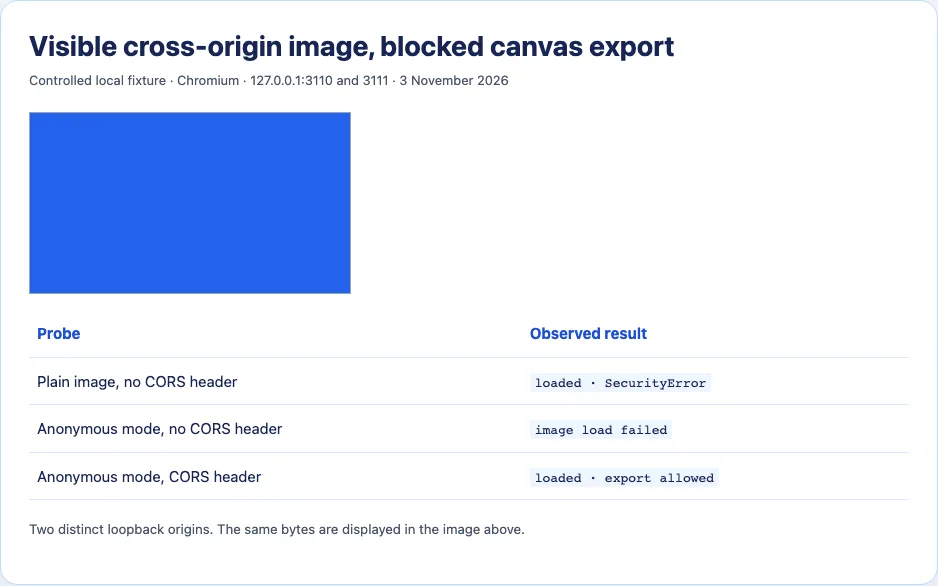
That middle result is important. Adding crossorigin is not merely a way to silence a warning; it asks the browser to make a CORS-enabled request. The server must grant the matching access. If the external host does not send an appropriate response header, the image may stop loading instead of becoming exportable. The image element reference describes how the attribute changes the request and subsequent canvas use.
The local * header works for our anonymous, non-credentialed fixture. It is not a recommendation to expose every private image through a wildcard CORS policy. Credentialed requests have different rules, and the response must match the intended origin and credential mode. Decide what sites are authorized to read pixels before changing a production host's policy.
Inspect the actual image response
In Network, select the image GET that the canvas code used. Record its final URL after redirects, status, Access-Control-Allow-Origin, any credential-related CORS headers, and the request's Origin header if present. A short vanity URL may redirect to a storage URL with different headers. The permission must be effective on the response the browser evaluates; a header on the HTML page or an earlier redirect does not grant pixel access to the final image bytes.
Check when crossOrigin was assigned. Set it before assigning src so the initial image request uses the desired mode. Reusing a previously loaded image element or cached response can make debugging confusing; create a fresh image element and use a fresh test context while narrowing the cause. A canvas can also be tainted by a second image drawn later, so a successful first image does not prove the whole composition is exportable. Test each source independently before combining layers.
If the image host is yours, configure CORS on the image delivery path and verify it at the final URL. If the host is a third party, request a CORS-enabled delivery endpoint or obtain the image through a permitted, authenticated server flow. A server-side relay introduces its own access and security responsibilities: validate destination hosts, block internal network targets, limit size and type, and respect the original access policy. An open “fetch any URL” proxy is a security problem, not a general solution to browser origin rules.
Do not confuse this with an ordinary broken image
A failed <img> load can be caused by a 404, invalid bytes, Content Security Policy, blocked mixed content, or authentication. Canvas tainting is narrower: the image may render perfectly, then pixel readback fails. Conversely, a CORS-enabled request that the server refuses never supplies an image to draw. The screenshot captures both outcomes so the distinction is visible.
If the desired feature only displays a remote picture, you may not need canvas export rights at all. If the feature crops, samples colors, creates a downloadable composite, or runs pixel analysis, you do. Design the data flow around that requirement before choosing an external image host. The browser's SecurityError is the enforcement of that boundary, not a switch that should be disabled in the visitor's browser.

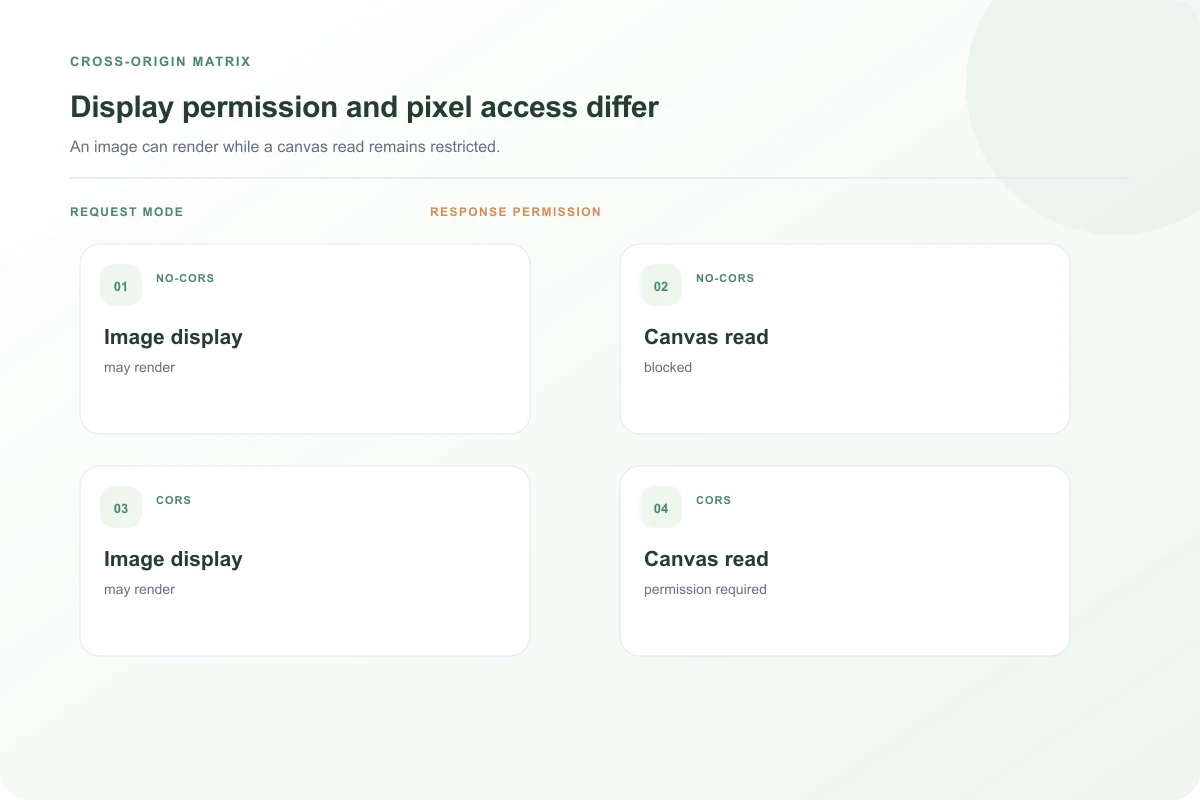
A four-case diagnostic matrix
There are two independent questions: did the image request use CORS mode, and did the final image response grant that request? Without a CORS-enabled request, the image can display but its pixels are not available for canvas export. With a CORS-enabled request and no matching permission, loading can fail. With both sides aligned, the image can load and its pixels can be read. A same-origin image is a useful control because it does not cross this particular boundary. Testing those cases with separate image elements makes a confusing error sequence much easier to interpret.
The order of operations matters. If code assigns src first and crossOrigin later, the initial request may already have been made in the wrong mode. Create a new Image, assign crossOrigin = 'anonymous', attach handlers, then set src. If a framework reuses an image element, confirm that its props cause a new request with the intended mode. Do not assume changing an attribute on an already loaded image retroactively authorizes pixels that were drawn earlier.
Each canvas has its own state. Once tainted, clearing it with clearRect() does not make past foreign pixels trustworthy again. Create a new canvas for a controlled retest. Also isolate each layer in a composite export: one approved background plus one unapproved sticker can make the final canvas unreadable. Developers sometimes test the main photo, see it succeed, and miss an external logo or SVG image added later in the draw sequence.
Credentials change the policy conversation. An image restricted by cookies should not be made world-readable by adding a wildcard CORS header. If cross-origin credentialed access is genuinely required, configure a deliberate allowed origin and credential policy, and examine the host's authentication model. CORS permission is about which pages may read the response through browser APIs; it is not a substitute for authorization on the file itself. A private image still needs a valid access check.
Save a support bundle containing the page origin, final image origin, request mode, final CORS headers, whether the image loaded, and the exact method that raised SecurityError. Remove tokens and private pixels from shared captures. That evidence lets the image host decide whether an allowed cross-origin read is appropriate; it also avoids asking them to change headers when the actual problem is a redirect or a second drawn asset.
If the image URL is already same-origin but the canvas still reports tainting, inspect all other drawn resources. A CSS-generated background, video frame, nested SVG image, or offscreen staging canvas can carry foreign pixels into the final canvas. Drawing one canvas into another carries the restriction with it. A useful experiment is to create a fresh canvas and add layers one by one, attempting a tiny getImageData(0, 0, 1, 1) after each draw. The first failing addition identifies the source that needs attention. Do this with safe test assets so diagnostics do not export or log private content.
Remember that an image can load from a URL that redirects across origins. The address written in the HTML is not necessarily the origin of the final image response. Compare the browser's Network chain and CORS decision with the final destination. When a service replaces temporary image URLs or sends users through an authentication gateway, the permission must remain correct along that route. A permissive header on the page itself cannot authorize another server's pixels.
A worked editor failure
Imagine a crop editor that previews an external avatar with <img> and copies it to canvas only when the user presses Save. The preview looks fine, so the team assumes the server path is healthy. At Save, toBlob() throws SecurityError. The first control is to draw a same-origin generated square into a fresh canvas and export it. If that works, the canvas and export code can function. Next draw the avatar alone. If it fails, inspect the avatar request mode and final response permission. This avoids changing crop mathematics when the actual failure is an origin boundary.
If adding crossOrigin="anonymous" makes the preview disappear, that is new evidence, not a regression in the crop algorithm. The browser is now asking the image server for permission to expose pixels, and the server has not granted it. Ask the image host to allow the intended origin if policy permits. If the host cannot or should not grant access, design a server-side path that obtains the image under the application's own authorization, validates it, and returns a safe derivative to the editor. That path must respect the source's rights and prevent arbitrary network fetches.
When the avatar succeeds but a composite export still fails, add the remaining assets one at a time. A watermark, sticker, or background fetched from another host can taint the same final canvas. Export after each addition from a new canvas. The first failing layer is the one whose request and permission need inspection. This is more reliable than changing CORS settings on the avatar simply because it was the most visible image in the editor.
The distinction between showing and reading pixels is the central rule. A browser can safely present a remote picture without granting every website the ability to sample it. Successful rendering is therefore not a promise of export permission. The site and image host must agree on that additional access, and the final response must carry the appropriate policy.
Verify the repaired editor with a newly loaded image and a newly created canvas. An earlier tainted canvas stays tainted, and cached image requests can obscure a changed header. Confirm both that the image loads and that the actual export method succeeds. A green Network request by itself is not the end of the workflow the user reported.
Sources and research
Three image/CORS combinations were tested across localhost ports 3110 and 3111 in Chromium 156 on 3 November 2026. The browser produced SecurityError for the visible no-CORS image.
- MDN: Use cross-origin images in a canvasDrawing unapproved cross-origin pixels taints a canvas and blocks readback/export.
- MDN: HTML image elementThe crossorigin attribute changes image request mode and canvas reuse.
- Stack Overflow: canvas.toDataURL SecurityErrorAn older real-world report illustrates visible image plus failed export, without proving its present-day third-party host behavior.