Separate browser cache, CDN cache, validation, and stale markup when replacing an image leaves visitors seeing the previous version.
The image was replaced this morning. Your teammate opens the page and sees the new version, but your existing tab still shows the old one. Another visitor says the page refreshed yet the image did not. The temptation is to append a timestamp to every image URL and move on. That can hide the immediate problem, but it does not tell you which copy was served, whether the HTML still points at an old asset, or whether validators will keep confirming the wrong content.
A URL is a cache identity. When bytes change behind that same identity, stored responses can stay fresh until their advertised lifetime ends. A browser, a shared cache, and the application itself may each hold something different. MDN's HTTP caching guide explains freshness and revalidation; those concepts give you a way to diagnose the incident without relying on a single reload gesture.
Write down the two URLs and two versions
Before touching cache controls, record the page URL, the image URL selected by the browser, and a simple identity for the actual bytes. In Developer Tools, inspect the visible image element and read currentSrc, especially if the page uses srcset or <picture>. Save the image response from the affected session and from a fresh context. Compare their status, headers, length, and a hash of the downloaded body. A changed file in your upload interface does not prove that the public URL now returns changed bytes.
curl -sS -L -D current-headers.txt -o current-image.bin 'https://your-owned-host.example/assets/diagram.png'
shasum -a 256 current-image.bin
Keep the request URL exact when comparing visitors. A query parameter, redirect, cookie, or content negotiation header can change the effective resource. If the page has a responsive image candidate, its source might not be the file you replaced. A screenshot of an old image is less useful than the selected URL and response hash beside it.
The first division is simple. If the fresh public GET still has old bytes, investigate the origin or a shared cache. If a fresh GET has new bytes but the affected browser serves old bytes, inspect the browser's cache policy and any service worker. If the selected URL differs, the HTML or responsive source list may be stale. These branches lead to different fixes.
A local same-URL replacement
We generated red and blue PNG fixtures and served them through one loopback path with Cache-Control: public, max-age=120. The response included an ETag matching the version. In one Chromium 156 context, the first fetch returned the red response, 629 bytes, with ETag "red". After the origin switched to blue, a second fetch of the same URL still yielded red and the same validator. A newly versioned URL returned blue, 630 bytes, with ETag "blue". The result shows a fresh browser-held response in a controlled setup; it is not evidence that a particular CDN has cached your image.
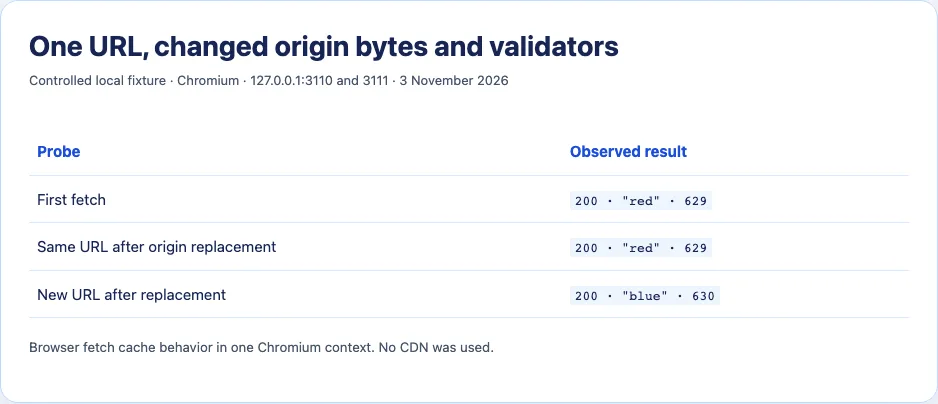
This small example also shows why changing the origin file can be invisible to an existing browser until the response becomes stale or is explicitly revalidated. It does not imply that every browser request with a changed query string must bypass every CDN: the delivery system determines its cache key. Nor does it imply that a user pressing Reload always produces the same network path in every browser or intermediary configuration.
Read the response path layer by layer
In the browser Network panel, turn on Preserve log, load the page in the affected state, and select the image request. Look for a memory or disk cache indicator, status 200 or 304, Cache-Control, ETag, Last-Modified, and Age. A 304 means the client revalidated a stored body; it does not contain a newly transferred image. If a resource changed but its validator stayed the same, a client could keep reusing the wrong body. Treat an unchanged ETag on changed bytes as a delivery bug to correct, rather than as proof that nothing changed.
For a Cloudflare-backed URL, Cloudflare's cache documentation describes CF-Cache-Status values and the meaning of Age on responses where it appears. Read that header on the actual image response, not on the HTML document or an unrelated request. A HIT helps locate a shared-cache response, but edge rules, Workers, and separate browser caching can still affect the result. Do not invent a cache status for a local fixture or infer Cloudflare behavior from a browser's generic “from disk cache” label.
Compare a fresh browser profile or device with the affected tab. If both receive the same old public response, inspect the upstream delivery layer. If only the old tab differs, a local cache is more plausible. Then compare the requested URL with the intended new asset. Cached HTML can continue to request an older filename even after the newer image exists. Purging the image alone does not rewrite that markup.
Revalidation is different from deleting a copy
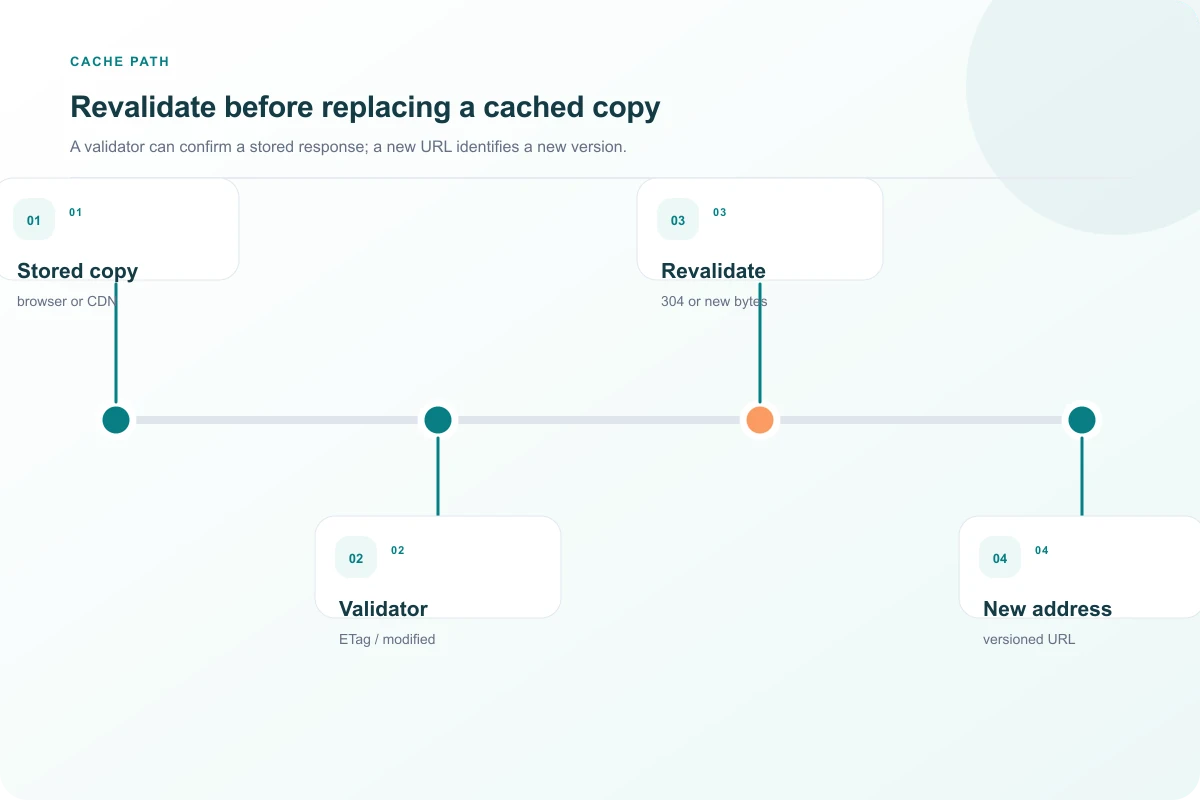
Cache-Control: no-cache allows a response to be stored but requires validation before reuse. no-store addresses storage. These are not interchangeable “turn cache off” switches. Neither retroactively deletes a response already stored under an earlier policy. A max-age response can be reused while fresh; when stale, its ETag or Last-Modified validator can enable a conditional request. If the origin says 304, the cache keeps its body. That is efficient when the validator accurately describes the bytes and confusing when it does not.
An application-managed cache may sit outside ordinary HTTP caching. A service worker can intercept a request and supply an earlier response. If Network evidence points there, inspect the service worker's registered scope and cache entries before changing CDN settings. This is an advanced branch, not the default explanation for every stale image. The same principle applies to client-side state: a framework can keep an old URL in mounted markup even when the underlying file changed.
Choose a policy that matches how the image changes
For assets that are revised frequently at a stable URL, use a short freshness period or deliberate revalidation with correct validators. An overwrite workflow may also need an edge purge after the object changes, and you should verify a fresh GET at the public URL afterward. A purge of a CDN object does not remove every response already held in visitors' browsers. If immediate global replacement is a hard requirement, a stable URL with long browser freshness is a poor fit.
For assets whose URL you control in page markup, versioned filenames make identity explicit: diagram.v2.png is a different resource from diagram.v1.png. You can cache the immutable file for a long time and update the HTML to reference the new name. That approach still depends on the HTML reaching the visitor. A query version such as diagram.png?v=2 can also work when the full delivery route includes that query in its cache key; verify it rather than assuming it.
When debugging, avoid recommending that every visitor clear all site data. That discards useful caches and masks the policy you need to fix. Collect one affected and one fresh response, note the selected URL and validators, then change the owning layer. The repair is complete only when the public page selects the intended version and a normal request receives the expected bytes under the intended cache policy.
A two-visitor incident log
Suppose visitor A loaded header.png at 09:00 under max-age=86400. The object is overwritten at 10:00. Visitor B first opens the page at 10:05 and sees the new picture because they had no stored copy. Visitor A refreshes the page at 10:06 but their browser can still use its fresh image response. A CDN purge at 10:10 can make new edge requests fetch the new body, yet it does not reach into visitor A's local cache. The times are an illustration of cache freshness, not a measured production incident. Writing such a timeline for a real report is valuable because it separates “replacement happened” from “each cache had reason to ask again.”
Now suppose both visitors see the old image after a purge. Check the selected URL and the origin body. The page might still point to header-v1.png; the supposedly replaced object might be in a different bucket or path; a Worker might cache a transformed derivative under another key. An edge MISS alone does not prove the response has the new bytes. Save the body and compare its hash. If a cache status says HIT on the HTML page but you are investigating an image, move to the image request before drawing a conclusion.
There is also a validator failure worth testing when bytes change under a stable URL. A conditional GET sends If-None-Match or If-Modified-Since. The server should compare the validator to the current representation. Returning 304 for a changed body tells the client to keep an obsolete copy. If the origin rebuilds files but preserves old ETags or modification times, correct that logic before tuning TTLs. A short TTL with a broken validator can still produce stale output after every revalidation.
Finally, document what consistency you require. A logo correction that should appear quickly may need a new asset URL and updated HTML. A user-uploaded image edited in place may require shorter freshness and explicit invalidation. A versioned immutable file can keep a long lifetime, but it creates a responsibility to update every reference. These are product decisions about change frequency and acceptable delay, not a single universal “best cache header.”

Work through a misleading 304
Suppose an affected browser revalidates avatar.png with If-None-Match: "a1" and receives 304. It continues showing its stored image. A fresh browser also requests avatar.png and gets status 200 with the new picture. That combination suggests the conditional path deserves scrutiny. Capture the origin's current ETag on an unconditional GET and compare it with the validator sent by the affected browser. If the current representation is new but the server confirms the old ETag, the validator implementation is wrong. Purging an edge cache may temporarily hide the bug, but future conditional requests can recreate it.
Alternatively, the 304 may be correct because the browser is asking about an older URL selected by cached HTML. In that case the ETag and body can agree perfectly, while the page still displays the wrong version. Inspect currentSrc and compare it with the URL your new HTML is supposed to emit. Fix the page or its cache policy, then verify that the browser requests the new asset. Cache-status headers alone cannot tell you whether the page chose the intended file.
When testing a query-string version, verify the behavior at each layer. Request avatar.png?v=2 through the public host and compare its body hash with avatar.png?v=1. If both return the same old bytes, the query might be ignored by the cache key, the origin may still be old, or the application may be normalizing the URL. A changed URL is a diagnostic tool only after you confirm it maps to a changed representation. Versioned filenames are often easier to reason about because the path itself changes.
After a repair, test an existing session and a fresh session at normal settings. A forced no-cache request can prove the origin has new bytes while ordinary visitors still receive an old fresh response. The release is effective when the page and image caching policies deliver the expected version without requiring manual cache clearing. Save the before-and-after hashes and response headers so a later recurrence can be compared with facts rather than screenshots alone.
Sources and research
A red/blue PNG replacement was tested under one localhost URL in Chromium 156 on 3 November 2026. No CDN or Cloudflare cache was used.
- MDN: HTTP cachingFreshness, revalidation, validators, no-cache, and no-store have distinct behavior.
- Cloudflare: Cache responsesCF-Cache-Status and Age can help interpret Cloudflare edge cache responses.
- Stack Overflow: Refresh image with a new one at the same URLA long-running developer discussion records the recurring symptom, not a current universal cache fix.