Trace an R2 image download through the delivered Content-Type, Content-Disposition, link context, and cache before changing object metadata.
An image saved from your R2 URL opens normally in an image editor, yet entering that URL in a browser starts a download. The file is probably not the first thing to repair. A valid PNG can be delivered with instructions that ask the browser to save it. A URL ending in .png can also return an HTML error page, and a page's Download button can change what happens on click. Those cases look similar from the visitor's side, but require changes in different places.
The useful starting point is the response the browser actually receives. Cloudflare allows upload metadata for Content-Type and Content-Disposition, among other fields. That metadata is one possible source of delivery headers. A Worker, custom delivery layer, transformation, redirect, or cached response can create a different final response. Inspect the public URL first, then trace back toward the object.
Follow the final GET, not the filename
Open Developer Tools before visiting the URL, keep the Network panel open, and select the image request after the navigation completes or the download starts. Record the final status, response URL after redirects, Content-Type, Content-Disposition, and any cache indicators. The document URL you copied might redirect to a signed delivery address; the decisive headers are on the response that supplied the bytes. When a browser download disappears from the Network panel, the command line gives a repeatable capture:
curl -sS -L -D headers.txt -o image-response.bin 'https://your-owned-host.example/path/image.png'
file image-response.bin
shasum -a 256 image-response.bin
Use a URL and output location you own. -L follows redirects, and -D saves response headers. If there are several header blocks, inspect the last successful response as well as the redirect chain. Do not paste a private signed URL into a public bug report; its query string can grant access to the object. The file result is a useful independent clue about downloaded bytes, though it does not tell you what headers a browser received.
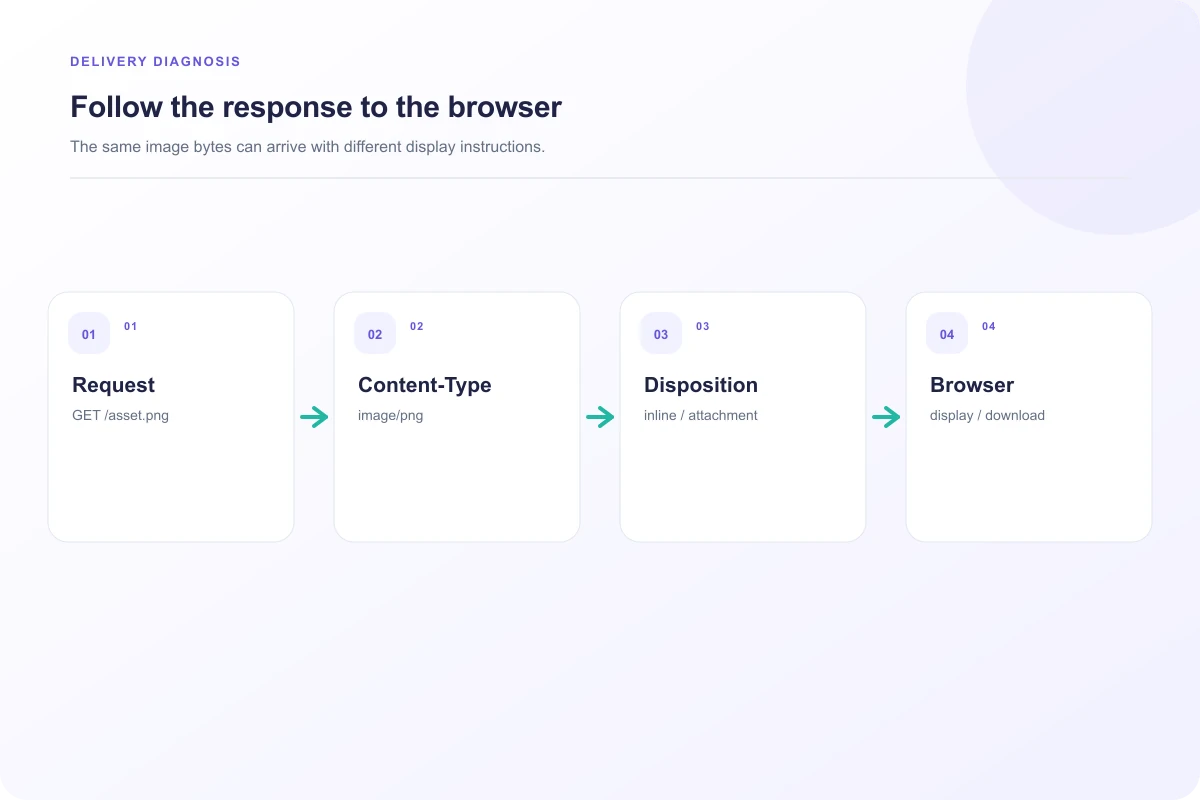
Look particularly for Content-Type: image/png (or the type matching your actual format) and Content-Disposition: attachment. According to MDN's header reference, attachment asks the browser to handle the body as a download, while inline expresses an in-browser presentation preference. inline is still not a command to render any arbitrary body. If the server sends application/octet-stream, a generic binary response, the browser has less reliable information about the format. If it sends text/html, inspect the body for a login, denial, or error page before changing image metadata.
What a controlled response comparison showed
For this article, we generated one original 320 × 180 PNG and served the same bytes at three loopback URLs. Chromium 156 fetched all three with status 200. The responses differed only in the relevant metadata: image/png with inline, image/png with attachment, and application/octet-stream without a disposition. Direct inline navigation displayed an image document; clicking the attachment variant raised a browser download event. The screenshot records both the headers and those browser observations, not an R2 dashboard or a claim that every browser will make the same UI choice.
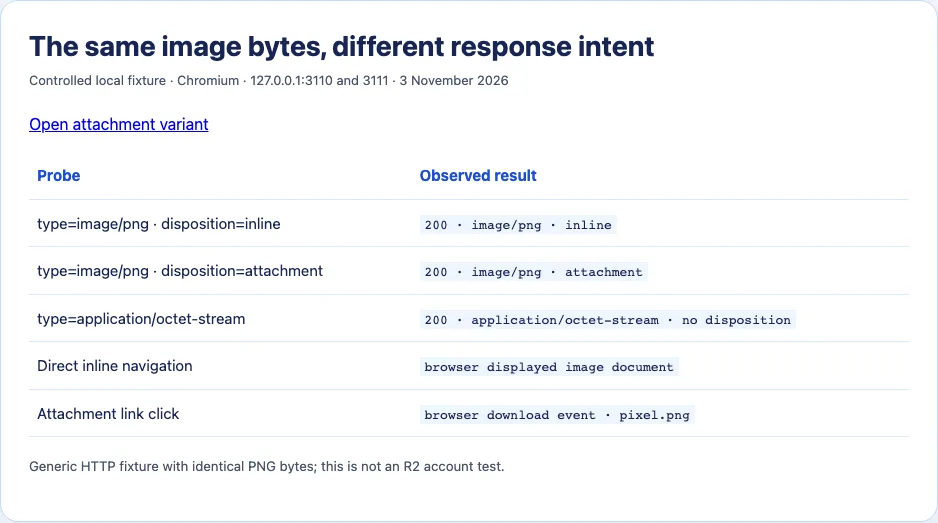
The exercise matters because it separates the two controls. Content type describes the media; disposition expresses how the server prefers it to be presented. A correct image type does not cancel an explicit attachment instruction. Conversely, changing attachment to inline will not turn a sign-in page or corrupted object into a usable image. This was a generic local HTTP test. It did not test an R2 object, Worker, or Cloudflare cache.
Find the layer that added the header
If the final GET contains attachment, inspect the object metadata in the upload path and compare it with the public response. Cloudflare's upload documentation lists flags for response-related metadata, so the uploader may have stored an attachment preference with the object. A server-side PutObject implementation can also set metadata. Correct future uploads at the point where metadata is created, and decide whether existing objects require a metadata update or replacement under your storage workflow. Verify the public response afterward; a successful metadata update in storage does not, by itself, show that a cached edge response changed.
If storage metadata looks right but the public URL still says attachment, follow the delivery route. A Worker can rewrite headers. An application route can fetch an object and then issue its own response. A proxy can preserve an old header while serving new bytes. A redirect can land on a separate host with different behavior. Compare the R2 or application-controlled origin route with the exact URL a visitor uses, where safe and permitted. The discrepancy tells you which layer needs attention.
Cached response metadata is easy to miss. An image body may be correct while a browser or edge still holds an older attachment header. Inspect Age, a provider-specific cache status, and the request's cache setting where available. Repeating a request with a fresh, deliberately versioned URL can help isolate a cache key, but a random query parameter is not universally a bypass: a Worker or CDN rule may ignore it. If you control the delivery pipeline, choose a predictable versioning and invalidation policy instead of asking visitors to clear their entire browser cache.
Compare direct navigation with the page link
If entering the URL directly opens the picture but clicking a button downloads it, inspect the link markup. An HTML anchor can carry a download attribute, and application code can fetch a blob and trigger a save. The anchor documentation also describes origin-related restrictions on the download attribute. Do not assume that an attribute on your page controls a third-party origin in the same way it controls a same-origin file.
The comparison is quick: open the image URL in a fresh tab, click a plain anchor to that same URL, and click the product's Download control. Capture the final response for each. If only the Download control saves, the user-facing behavior may be intentional. If direct navigation also saves, look at response metadata or browser preferences. Browser settings and extensions can influence downloads, so one person's result is not enough to declare the server fixed for everyone.
An apparently similar case is a URL that redirects to an access page. The address bar may still contain the image-looking path, while the response is HTML. Check status and body type rather than trying MIME guesses. A 403 or 404 HTML error cannot be repaired by renaming the object or forcing the browser to treat the body as PNG. Fix authorization, path, or signing first, and avoid making a private object public solely to make the symptom disappear.

A practical repair sequence
Start by saving one response capture from the exact URL that downloads. Confirm that the bytes are the intended image, then identify the delivered Content-Type and disposition. If you own the upload, correct metadata there and retest a fresh object. If you own an intermediary, inspect its response construction and cache policy. Finally, test the ordinary page link and a direct navigation separately. Each step narrows ownership without changing several layers at once.
You cannot repair headers on somebody else's host by editing your <img> tag. Ask that host for a browser-display URL or a corrected response, or use a delivery endpoint you are authorized to operate. If a download is the intended action, keep it explicit in the interface. The key evidence is the final response, because that is the part the browser actually has to interpret.
Preserve a useful incident record
If the fix has to go through a storage or platform team, give them a compact record rather than the vague statement “R2 downloads my image.” Include the exact public host and path with secrets redacted, the final response status, the two relevant headers, the saved body's detected format and hash, and whether the symptom appears on direct navigation. Add the upload method and the time the object was created or replaced. That lets the owner compare stored metadata with delivered metadata and identify whether the issue begins at upload or later in the route.
Check the URL's response in more than one context. A private browser window can expose an authentication redirect that your signed-in session hides; a cached browser tab can keep older headers. Mobile browsers may hand a file to another app rather than display it. Those differences do not make the original response capture irrelevant. They tell you which request conditions to reproduce. Preserve the final URL and request context beside the screenshot so another engineer can run the same check.
One subtle case is a correct header on a thumbnail but an attachment header on the original. A page may load a transformed image URL while its Open original control targets the underlying object. Compare the URL in currentSrc, the address copied from the image, and the link behind the control. They can be three distinct delivery paths with different metadata. Fixing one path may leave the user-visible complaint unchanged if the button still points elsewhere.
Also check whether the file was uploaded under the format you think it was. A PNG filename can contain WebP bytes after an image pipeline, or an endpoint can return a JSON error with status 200. The browser follows delivered bytes and headers, not the extension chosen by the uploader. Content sniffing differs by context and policy, so relying on it makes the outcome harder to predict. The durable repair is consistent bytes, type, and handling intent at the exact public endpoint.
A worked decision from one captured response
Imagine the final GET returns 200, Content-Type: image/png, and Content-Disposition: attachment; filename="logo.png". The saved body is a valid PNG with the expected hash. That evidence rules out a missing object and a wrong format as the immediate cause of the download. The next question is where attachment entered the response. If the R2 object's metadata also says attachment, correct the uploader or existing object's metadata. If the object says inline while the public route says attachment, inspect the Worker or application response builder. The comparison turns a broad browser complaint into one header ownership issue.
Now change only the disposition in a controlled environment and fetch the public URL again. Check the final response, not just the dashboard value. Navigate directly in a browser and verify that the same bytes render as an image document. Then click the site's Open link. If direct navigation renders but the page action still saves, inspect the anchor or JavaScript. This second step catches a common false finish: the storage metadata is repaired, yet the product continues to send visitors through its Download control.
If instead the final GET says text/html and the body is a sign-in page, stop before changing PNG headers. The image request is landing on an access route. Fix the authorization flow or provide the intended public display endpoint. Sending image/png for an HTML login body would make diagnosis harder and could produce a broken image icon rather than a meaningful error. The MIME label and the body must agree.
This decision tree is useful even when the object is not in R2. The browser does not know which storage service produced the response; it sees the final headers and bytes. Cloudflare's R2 documentation tells you where metadata can be set, while the local demonstration shows the generic HTTP distinction. Keep those two kinds of evidence separate when documenting a production fix.
Sources and research
Original PNG and three header variants tested on a local HTTP server in Chromium 156 on 3 November 2026. No Cloudflare R2 bucket or custom domain was tested.
- Cloudflare R2: Upload objectsR2 upload tooling supports Content-Type, Content-Disposition, and Cache-Control metadata.
- MDN: Content-DispositionInline and attachment express different content presentation intentions.
- MDN: HTML anchor elementThe download attribute and link origin affect browser download behavior.
- PayloadCMS community: R2 image triggers downloadA developer reported this symptom with an R2-hosted image; the thread does not prove its cause.